Time Management (GridVis-Desktop)
Valid for
|
GridVis editions |
Software platform |
|
|
|


Description
In the Time Management function, you configure Time points and Time periods for further actions and functions such as
Automatic reading (time points).
Resetting (time points).
Generation of reports (time points).
Database actions (time points).
Alarm management (time periods).
Tariff formation (time periods).
Key figures (time periods).
How do I open the function Time management in the GridVis Desktop?
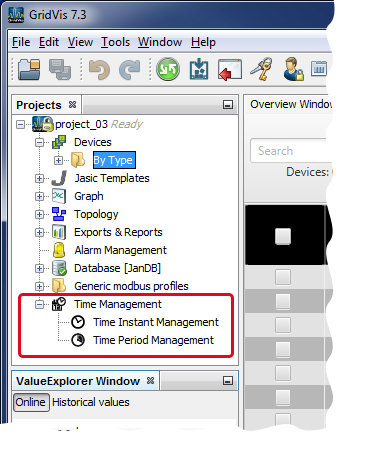
The Time planning window appears by double-clicking on the Time planning entry in the Projects window.
One click on the plus symbol in front of the Time planning entry in the Projects window opens the subdirectories Time point management and Time period management.
Double-clicking on the subdirectory Time point management opens the configuration window Time point management.
Double-clicking on the subdirectory Time period management opens the configuration window Time period management.
Configuration of the functions Time Management, Time points and Time periods
Note
The functions Time Management, Time points and Time periods
are configured in the GridVis Desktop in the same way as in the GridVis Web.
are each effective on the other platform respectively.
You will find detailed descriptions for the configuration of the functions under the link:
Time management
(area GridVis-Web).