Generic Modbus Devices - Measurement Value Recording
Configuration of the Measurement Value Recording
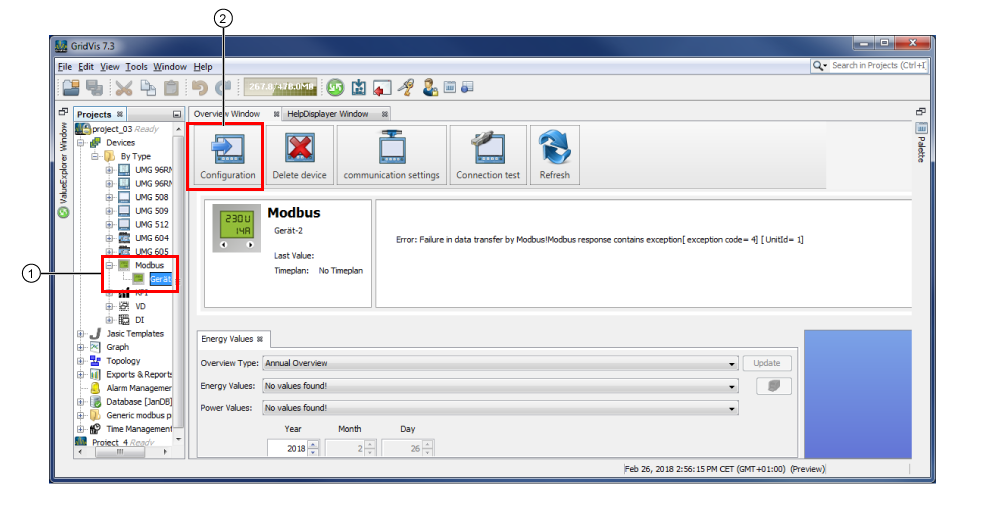
Step 1: Select generic Modbus device
|
Pos. |
Description |
|
1 |
Single-click to activate your Modbus device. |
|
2 |
Click to open the window Configuration of the Modbus device. |
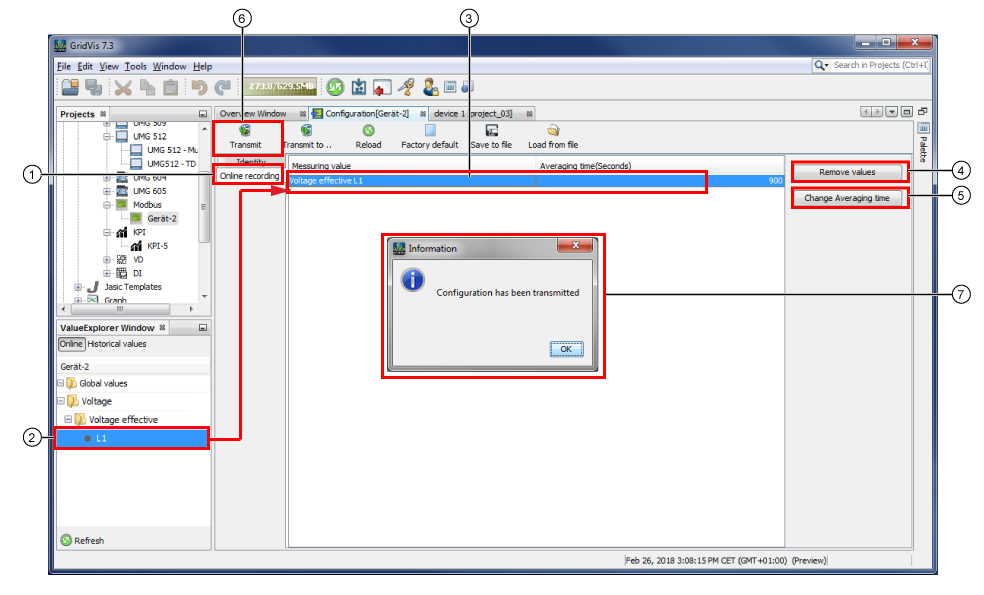
Step 2: Select measurement values for the recording
|
Pos. |
Description |
|
1 |
Activate the menu entry Online Recording in the window Configuration. |
|
2 |
Select measurement values of the generic Modbus device. Using drag-and-drop, pull them into the configuration window. |
|
3 |
The selected measurement values appear in the measurement value list. The average time shows the save cycle with which the measurement value is saved (in the fig. above - every 900 sec.) |
|
4 |
Removes activated measurement values from the measurement value list. |
|
5 |
Opens the dialog Change Average Time with the option list Select Average Time in sec. (60, 600, 900 standard, 1800, 3600). Select the average time and click on the button OK. |
|
6 |
If the measurement value list contains all of the recorded measurement values, then click on the button Transfer. |
|
7 |
Confirm the successful transfer of the configuration settings (measurement values that should be recorded) with OK. |