Visualize CO2 emissions and costs
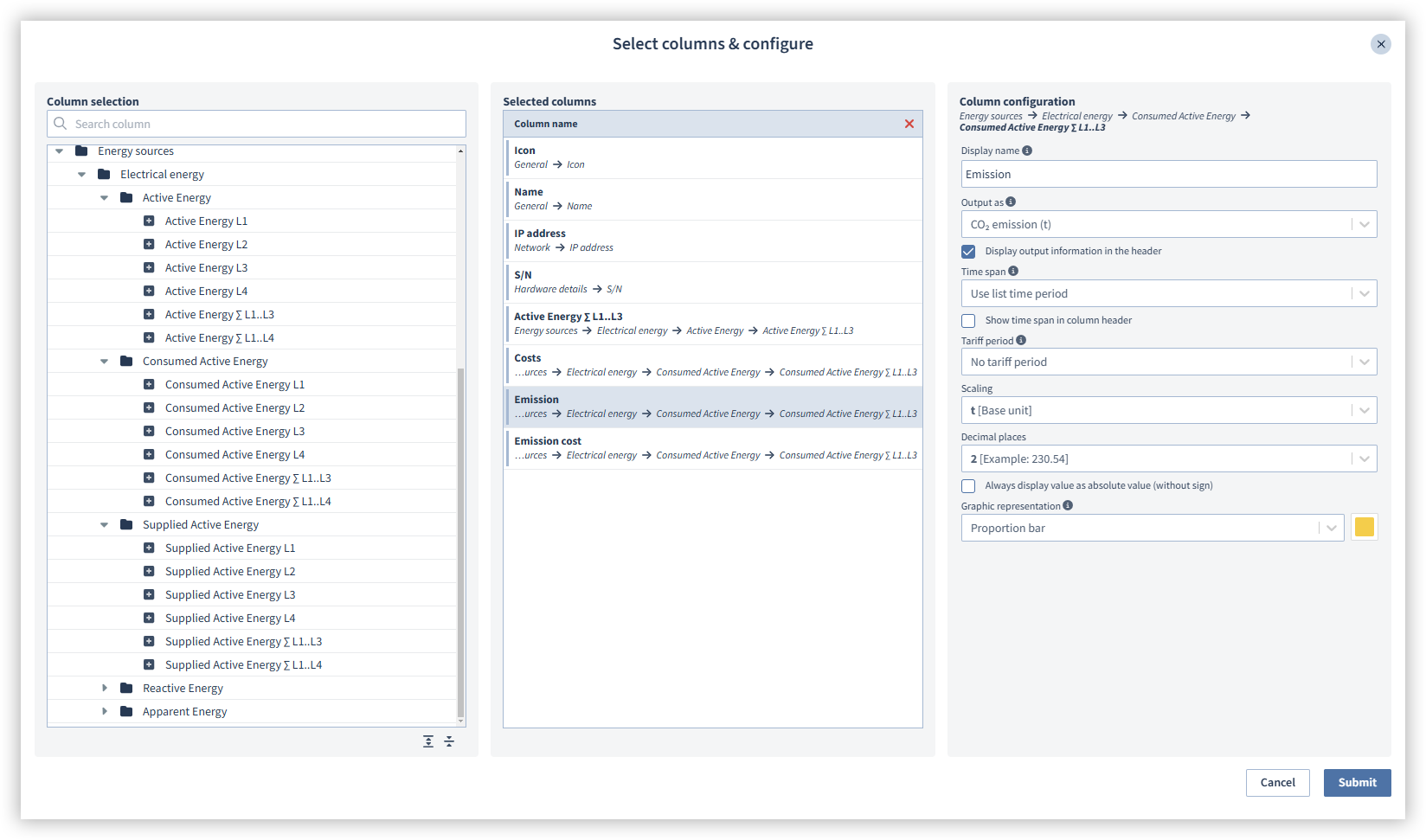
After you have created a Contract file , you can display your CO2 emissions and costs in one column of the Device overview . This gives you a quick overview of your current costs and emissions. Please note that you must first create a Contract file for the measured value. Proceed as follows to configure your CO2 emissions and costs for the column view:
Click on the column icon ().
In the Column selection area, select the measured value that you want to add to the device list.
Click the + symbol to add the column to the Selected columns area or drag & drop it into the area.
Click on the selected measured value in the Selected columns area. The column settings are then displayed.
Enter a display name for the column.
Select what form the output of the column should take. The appropriate424px9 values are taken from the contract to calculate the costs, energy equivalent, CO2 and CO2 emissions.
Select the list and tariff period for the column.
Select the scaling for the unit.
Select the graphical visualization.
Finally, click on the Confirm button.
The following table shows what information you can display in the device overview using contract files and what information you need to enter in the contract files in order to do the calculations for them.
|
Measured value |
Calculation |
|
Energy costs |
Energy costs are the expenses incurred through the consumption of energy. GridVis requires the following data for the calculation:
|
|
Energy equivalent |
An energy equivalent is a unit of measurement that converts different forms of energy to a common basis, namely watt hours (Wh). This makes it possible to compare and calculate the energy consumption and energy content of energy sources. This makes it easier to calculate and compare energy costs. GridVis requires the following data for the calculation:
Note The reference unit of the heating value factor is the unit in which your meters measure the medium. This may differ from the billing unit. For example, natural gas is often billed in energy units (e.g. kWh), while the meter measures the volume (m3). If the reference unit does not match the meter's unit of measurement, the energy equivalent cannot be calculated correctly. For gaseous media, the condition number must also be specified. You can find the condition number and the heating value in the information provided by your energy supplier. |
|
CO2 emissions |
CO2 emissions refer to the release of CO2 into the atmosphere. GridVis requires the following data for the calculation:
|
|
CO2 costs |
CO2 costs in connection with energy refer to the financial expenses arising from the release of CO2 during the production and use of energy. GridVis requires the following data for the calculation:
|