Text Objects
Text field
Use a text field to place and format text on report pages or dashboards.
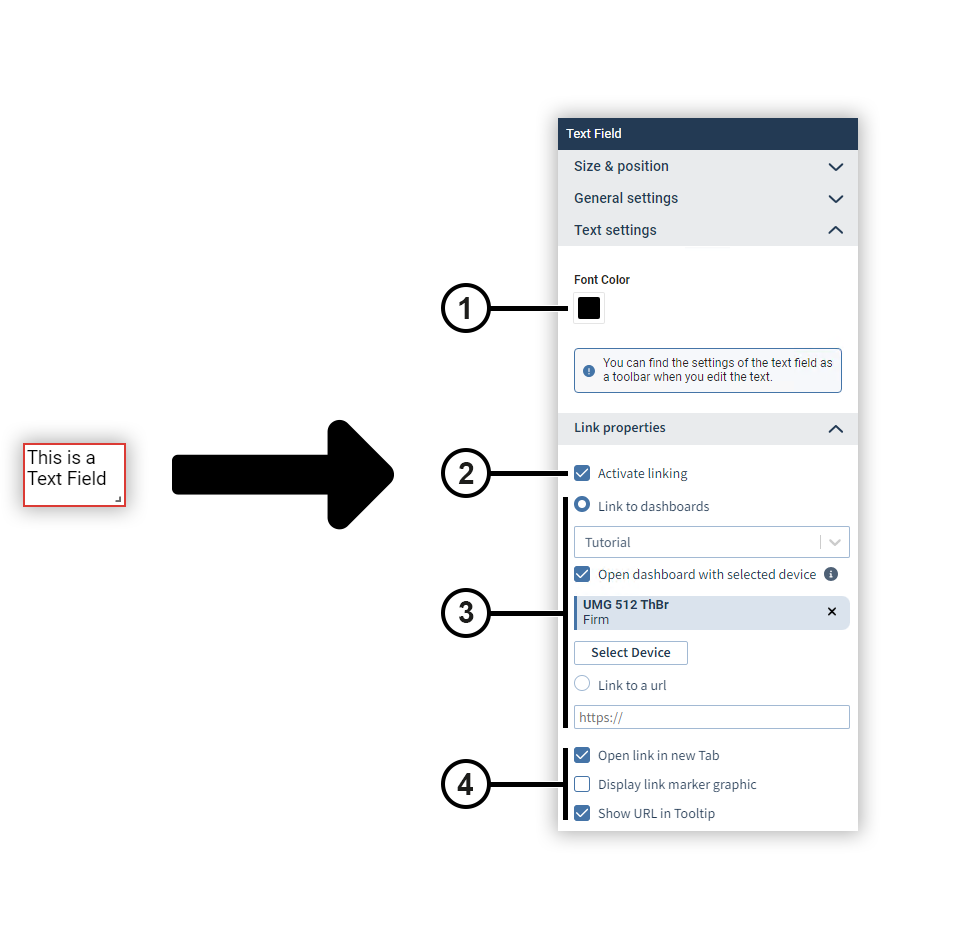
|
Position |
Description |
|
1 |
Defines the font color. You can find further options for text formatting as a toolbar when you edit the text. |
|
2 |
Activates linking (for dashboards only). |
|
3 |
Defines the destination of the link (for dashboards only). |
|
4 |
Defines the behavior of the link (for dashboards only). |
Dynamic texts
Dynamic texts contain information about a report or a dashboard that is automatically adjusted when corresponding changes are made. For example, if you add a page to a report, the dynamic text Total pages is automatically increased by one page.
You can format the content of a dynamic text using the text properties, but you cannot change it. You can also use the codes of the dynamic texts in text fields.
|
Name |
Code |
Description |
|
Current time |
##currentTime |
Displays the current time. |
|
Current date |
##currentDate |
Displays the current date. |
|
Report name |
##reportName |
Displays the name of a report. |
|
Report time |
##reportTime |
Displays the globally set time period of a report including the time. |
|
Report end time |
##reportEndTime |
Displays the end date and time of the globally set period of a report. |
|
Report start time |
##reportStartTime |
Displays the start date and time of the globally set period of a report. |
|
Dashboard name |
##dashboardName |
Displays the name of a dashboard. |
|
Dashboard time |
##dashboardTime |
Displays the globally set time period of a dashboard including the time. |
|
Dashboard end time |
##dashboardEndTime |
Displays the end date and time of the globally set time period of a dashboard. |
|
Dashboard start time |
##dashboardStartTime |
Displays the start date and time of the globally set time period of a dashboard. |
|
Device name |
##device |
In the presentation mode of a dashboard, displays the name of the device in use when all unpinned devices have been temporarily swapped. |
|
Total pages |
##pageTotal |
Displays the total number of pages in a report. |
|
Page name |
##pageTitle |
Displays the name of the respective page. |
|
Page number |
##page |
Displays the page number of the respective page. |