Device management


Add devices
Device list
Manage devices

Valid for

GridVis Editions

Software platform

images/download/thumbnails/251038027/GridVis_Icons_Standard_Expert-version-1-modificationdate-1744092627000-api-v2.png

images/download/thumbnails/251038027/gv_web-version-1-modificationdate-1741326196000-api-v2.png


images/download/thumbnails/251038027/Icon_Video-Tutorial-version-1-modificationdate-1755089325000-api-v2.png


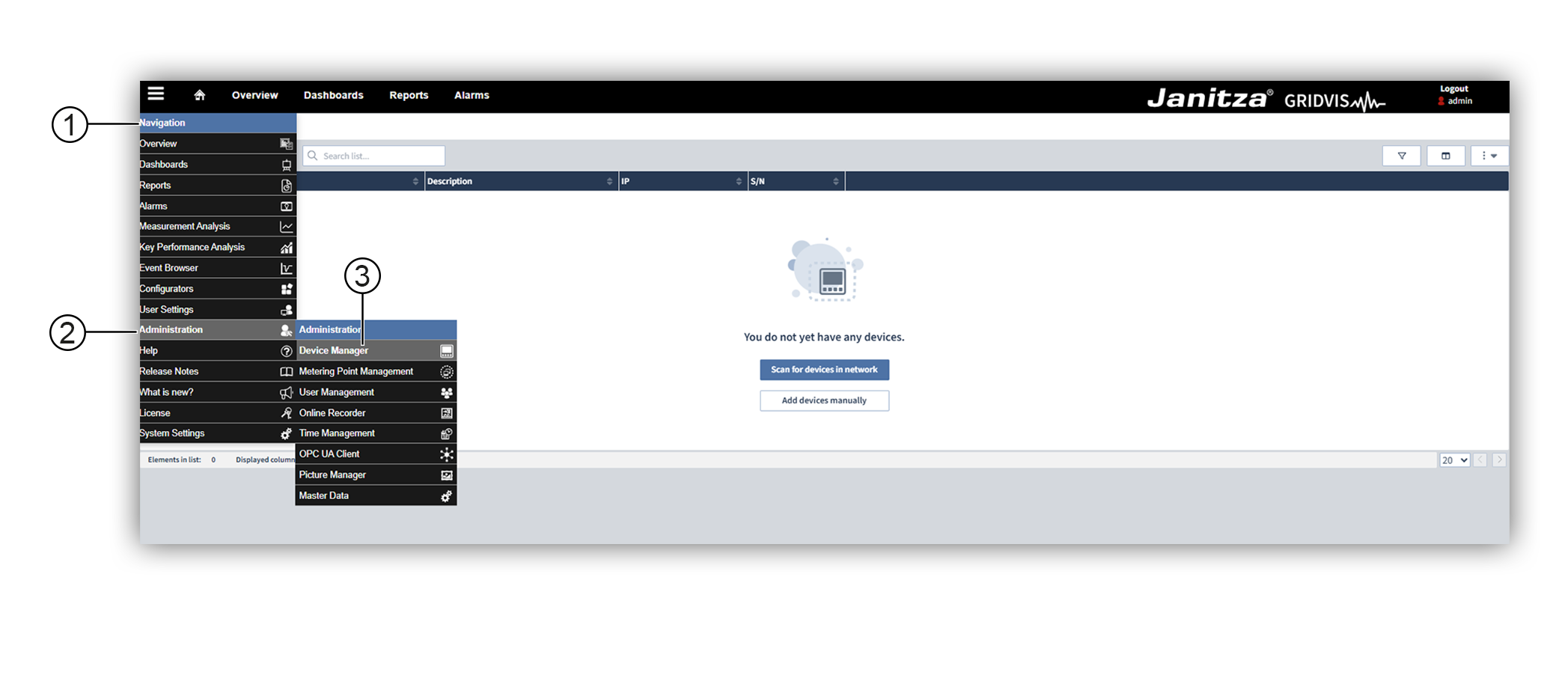
Access the Device management area as follows:

images/download/attachments/251038027/Gerateverwaltung-en-version-1-modificationdate-1749207052000-api-v2.png

Position

Control element

Action

1

Navigation

Click on the burger icon ( images/download/attachments/251038027/image-2025-6-6_8-56-22-version-1-modificationdate-1749192983000-api-v2.png ) to opern the Navigation menu.

2

Head Office

Move the mouse over the word Management to access the individual management areas.

3

Device management

Select Device management .