General
Settings
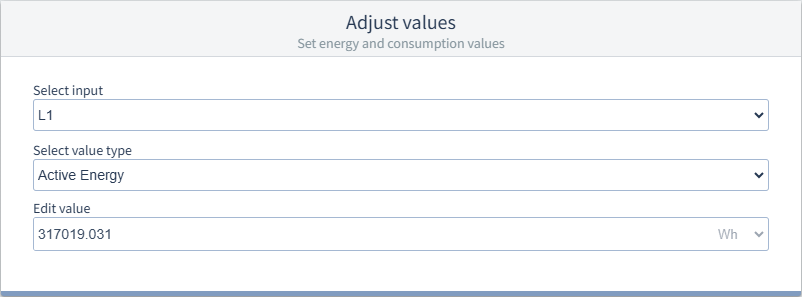
Identification
Device name
To uniquely identify a device, enter a name (max. 127 characters). The name is displayed in the header of the device display and in the GridVis software.
Device description
Free text field for a more detailed description of the device function, location, etc. (max. 229 characters). The description is stored in the database and only displayed in the GridVis software.
Moving Average Value
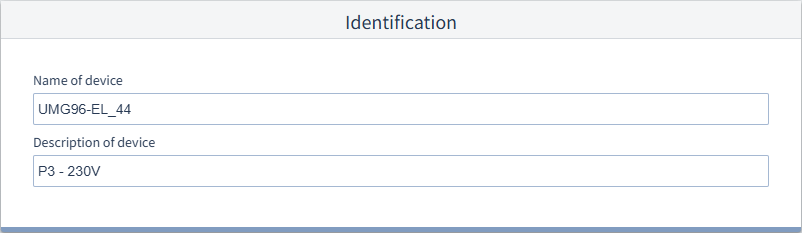
The measurement device records average values for the measured voltages, currents and powers including a time stamp.
Moving or sliding averages always apply to the last elapsed time interval, starting from the current time. The average values are recalculated every minute.
Example: Setting 8 min
When the values are queried at 10:17, the average values for the interval 10:09 to 10:17 are sent (accurate to the second for the last 480 s).
Voltage values
Time interval for capturing the average voltage values.
Current values
Time interval for capturing the average current values.
Power values
Time interval for capturing the average power values.
Setting values
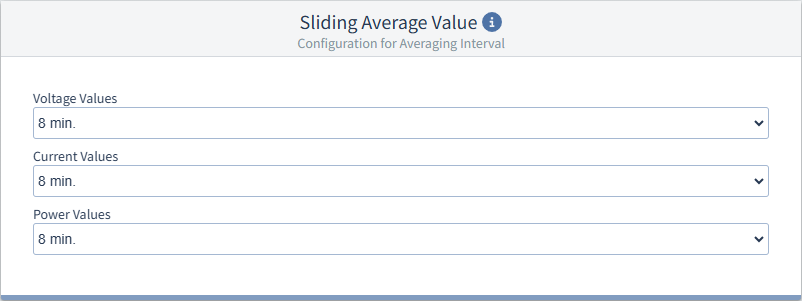
When you replace a measurement device with a new one, you can set the last values of the old measurement device as the start values for the new measurement device here.
To set consumption values:
Read out the previous values that are to be used as the new start values.
Fill the Select input (L1, L2, L3 and Sum L1 .. L3), Select value type and Edit value fields with a starting value.
Repeat step 2 for all desired inputs (start values).
Transfer the configuration to the device to set the Start values.
Select input
Select value type
In these fields, select a measured value for which you want to set a start value.
Edit value
Specify the start value to be transferred to the measurement device for the measured value selected under Select input and Select value type. Pay attention to the unit of your value.
By default, this field displays the current meter reading in the measurement device. Consequently, the meter reading in the measurement device will not be increased when you retransmit the configuration to the measurement device .