UMG 96-EL
General
Measurement
Logic
System
The device configurator allows you to conveniently set the measurement devices, as well as save and transfer the settings.
Further information on the functions of the measurement device can be found in the respective user manual, which you can download from our website www.janitza.com .
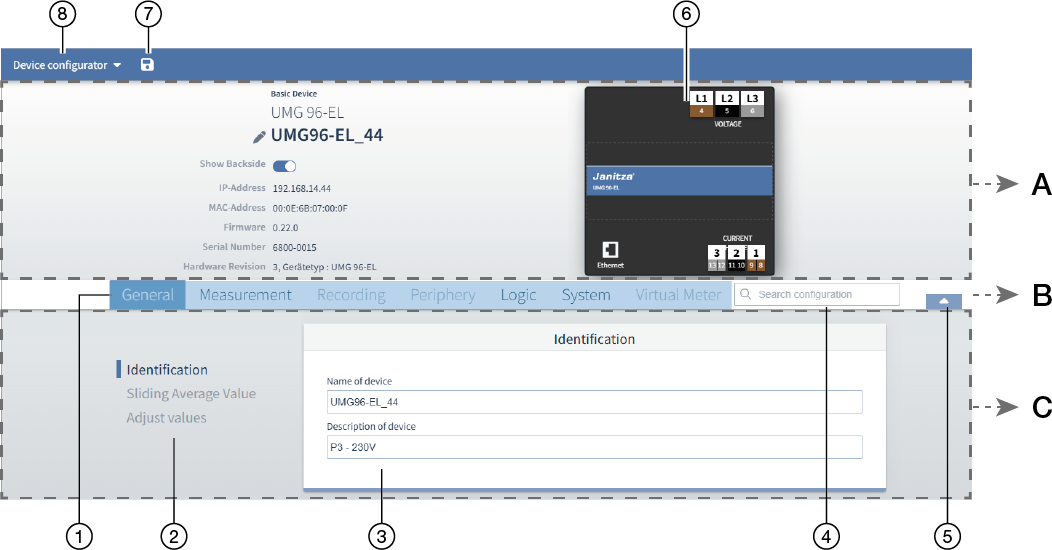
|
Item |
Legend |
Description |
|
A |
Info & Configuration |
In this section you will find basic information about the device, as well as a graphic illustration of the device. |
|
B |
Menu bar |
You can quickly navigate to the desired configuration card using the tabs for the corresponding main categories and the search field. |
|
C |
Configuration |
The lower area shows the set parameters and you can adjust them. |
|
|
||
|
1 |
Menus |
|
|
2 |
Submenus |
|
|
3 |
Configuration card |
|
|
4 |
Search |
Enter a keyword and you will be taken directly to the corresponding configuration menu. |
|
5 |
Hide/show device image |
|
|
6 |
Device image |
To configure connections, click on the corresponding connection in the device image. |
|
7 |
Transfer configuration to device |
|
|
8 |
Device configurator |
In the drop-down menu of the device configurator, select
When transferring to several devices, the parameters that can only be assigned once in the system are not selectable. |
Configuring the measurement device (quick guide)
This is an example. The steps may vary depending on the desired configuration.
Assign a device name (General > Identification).
Set the current transformer ratios (Measurement > Current transformer).
If available, set the voltage transformer ratio (Measurement > Voltage transformer).
Adapt the communication settings (e.g. Ethernet) to the actual existing network environment (System > Communication).