System
Settings
Time
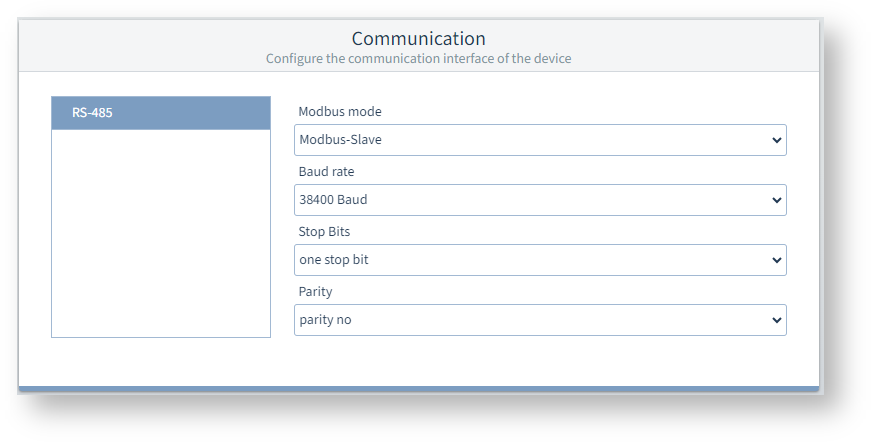
The time used by the measurement device can be synchronized with the actual time.
Especially when measured values from several measurement devices are evaluated, it is important that all measurement devices have the same time.
Synchronize device time
Click on the button Synchronize device time to manually transfer the UTC time from the PC to the measurement device once.
Click the diskette icon to transfer the new time to the measurement device.
Communication
RS-485
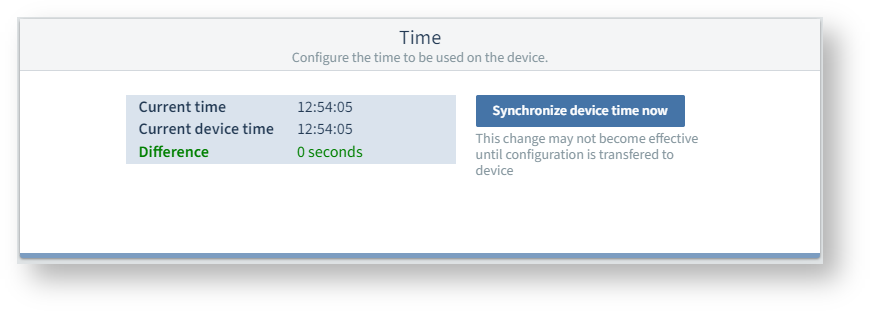
Click on RS-485 to display the settings. The measurement device can communicate via the RS-485 interface using the "Modbus RTU" protocol.
Modbus mode
Modbus slave: This measurement device is configured as a server (old designation, "slave"), which responds to the requests of the gateway (client).
Another device works as a gateway, i.e. it is also connected to a higher-level PC or server via Ethernet (Modbus TCP). As what is known as a Modbus client (old designation "master"), the gateway initiates communication and sends requests to the devices connected via Modbus.
Baud rate
Select a uniform baud rate for all devices in the bus structure.
With the automatic determination setting, the measurement device can determine the baud rate automatically.
Stop bits, parity
Select a uniform data frame for all devices in the bus structure.