GridVis 8.1
New functions
|
|
Short text |
Component |
Available as of |
|
|
Dashboard templates, measured value analysis & list function compatible with UMG 801 modular measuring device (from version 8.1.20)The use of the modular measuring device UMG 801 in dashboards, device lists and in the measured value analysis has been optimized and improved. The focus of the optimization was on the selection and display of the measurement and energy values of the UMG 801. |
Devices |
Standard, Expert |
|
|
GridVis Service – HTTPS encryption (from version 8.1.20)The data transfer between GridVis Service and web browser can now optionally be transferred securely via HTTPS. The encryption takes place via an SSL certificate. |
GridVis Service |
Standard, Expert |
|
|
Device lists can be loaded directly in the Event Browser (from version 8.1.20)In the Event Browser events of devices can be analyzed in great detail. With the extension from version 8.1.20, the device lists created by the user can now be selected in the Event Browser. This allows a comfortable connection of measuring devices without selecting them manually one by one. |
Data exports |
Standard, Expert |
|
|
New energy carriers and auxiliary materials (media) as system variables (from version 8.1.20)New system variables for gases, fuels and solid fuels have bee added. The system variables can be selected in the data import, virtual device, OPC UA client and for digital inputs of the measuring devices. |
Project |
Essentials, Standard, Expert |
|
|
Country code setting per user (from version 8.1.20)For each GridVis user, a setting for the country can be made in addition to the language. This setting helps to ensure that the values are displayed correctly. |
Project |
Standard, Expert |
|
|
Report editor – Device exchange extended (from version 8.1.20)The device exchange helps to exchange all used devices in a report and to reuse this report. Some enhancements have been made. It is now possible to exchange only a part of the devices or to assign all devices with one click. |
Report editor |
Expert |
|
|
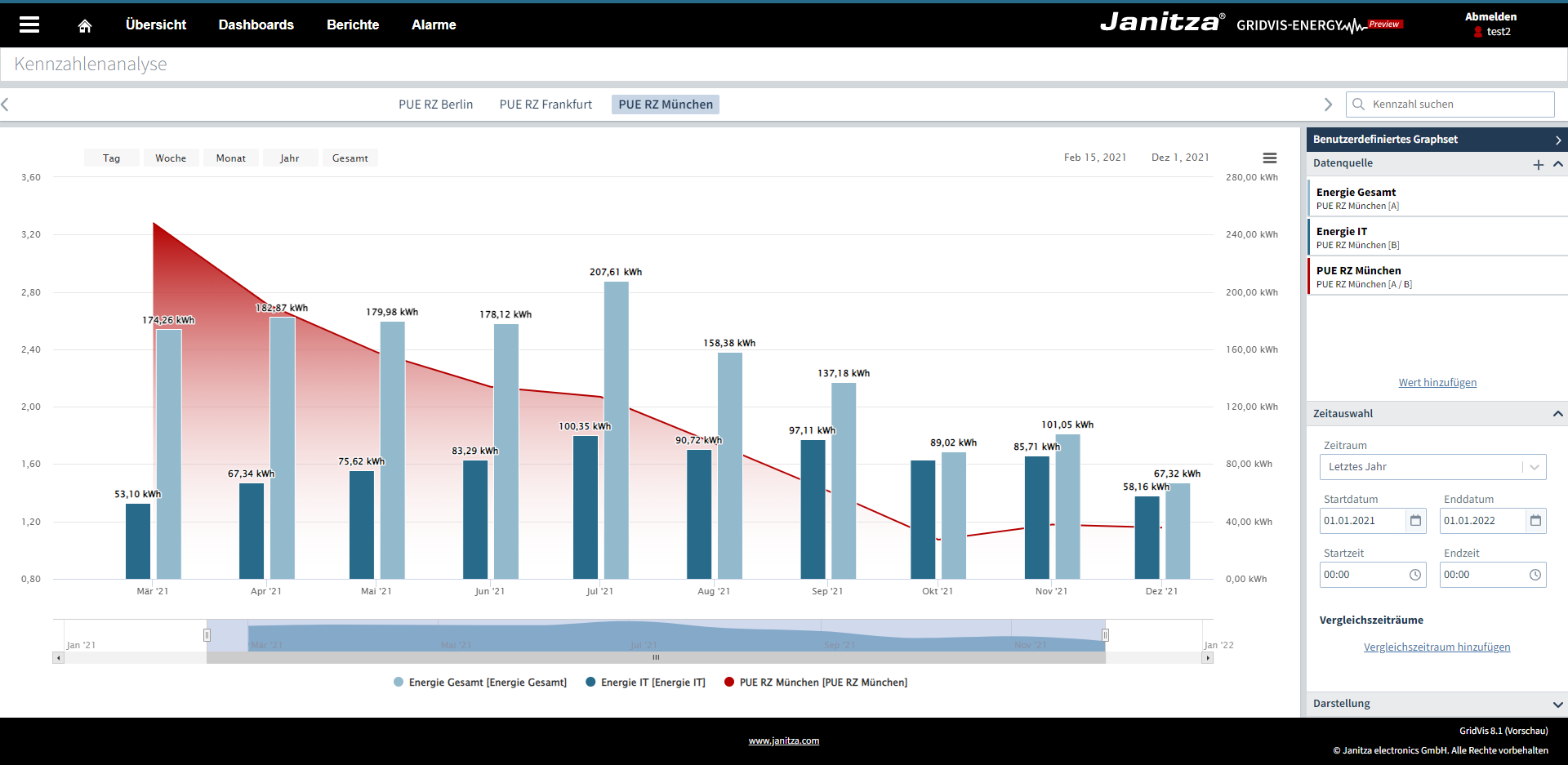
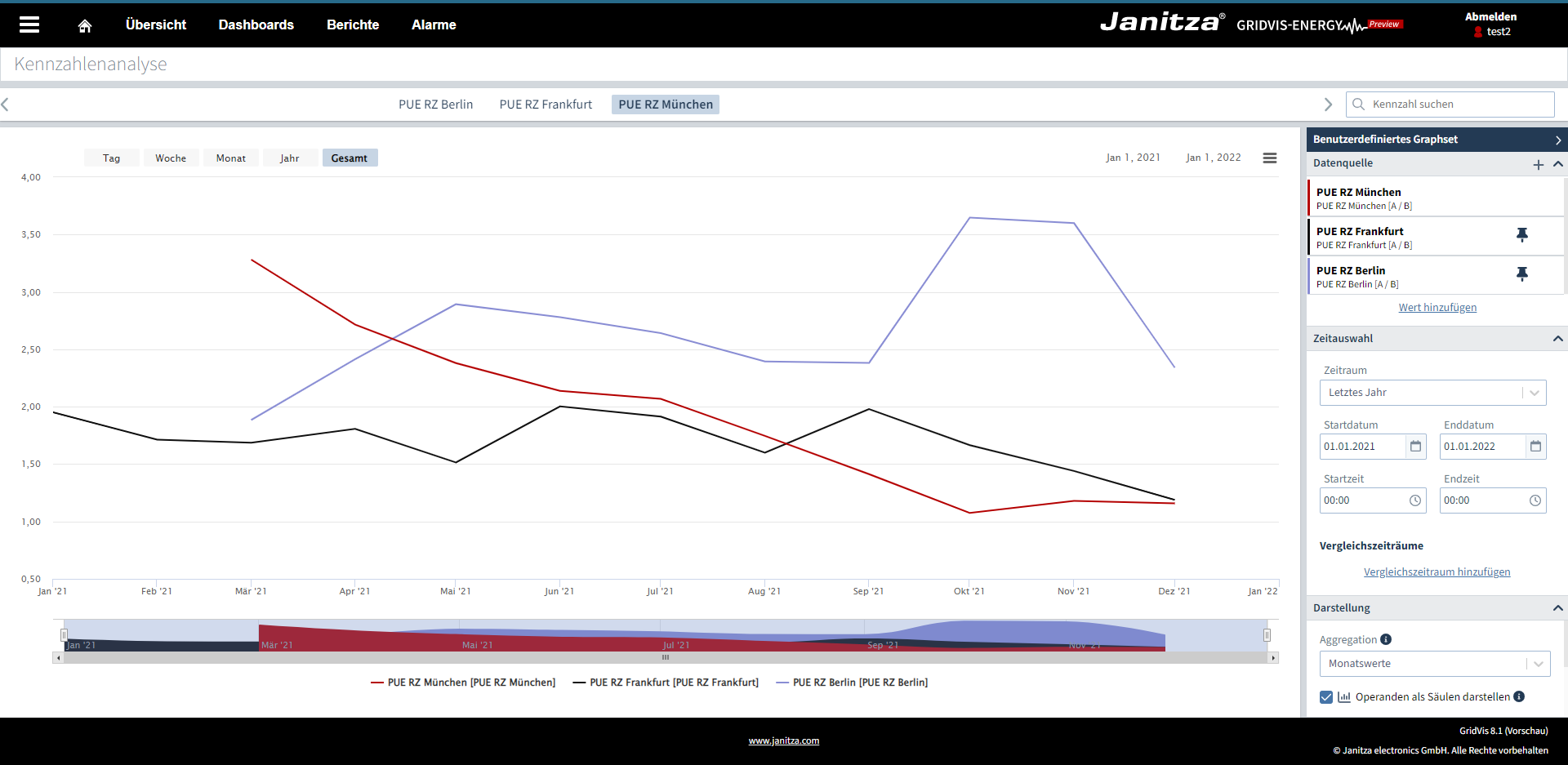
Key figure analysisWith the new key figure analysis, all created key figures can be evaluated across projects in a graph function. The function can be called up directly in the menu under Key figure analysis. Key figures can now be aggregated (e.g. to daily values). This makes it possible to calculate and display key figures in different time units. With the new comparison periods, it is also possible to display key figures in different time periods in one graph. With the help of the familiar pin function in the measured value analysis, different key figures can now also be compared with each other. With this function, it is then possible, for example, to compare production lines or locations with each other.
|
Key figures |
Expert |
|
|
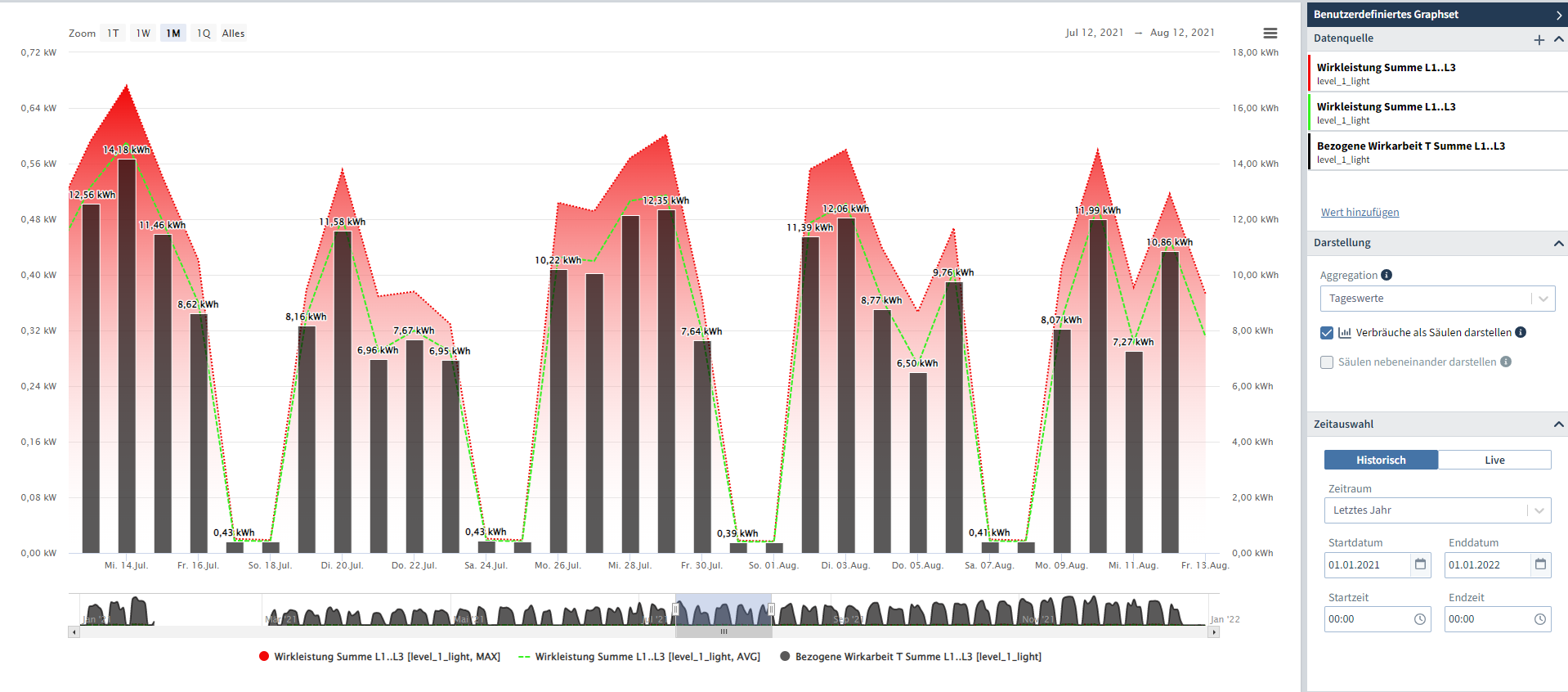
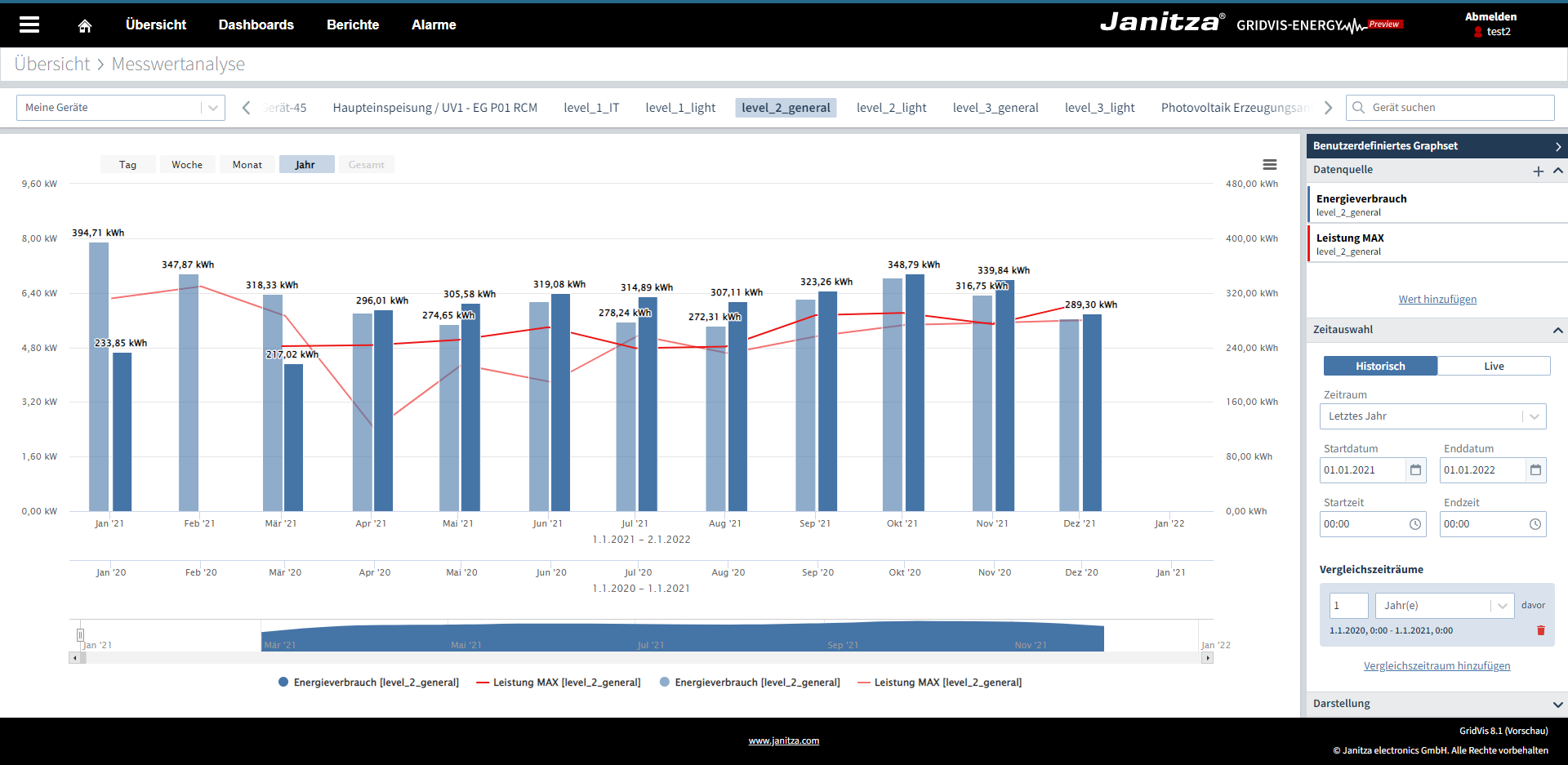
Measured value analysisThe measured value analysis can now be called up directly via the menu under Measured value analysis. In addition, consumptions can be drawn as columns. With the help of the comparison period, up to three periods can be displayed in one graph.
|
Measured values |
Standard, Expert |
|
|
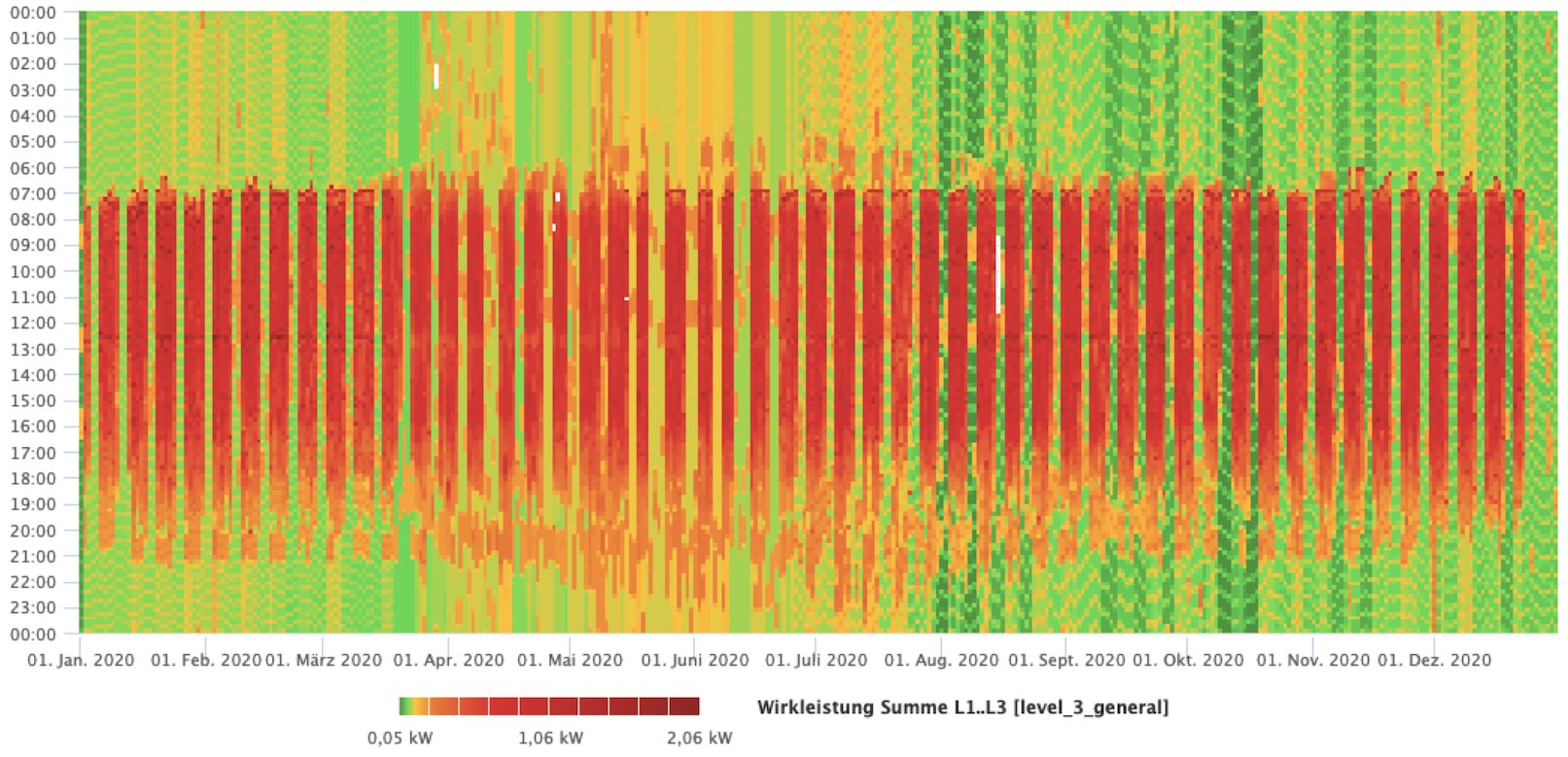
Report editor – HeatmapThe visualization object can display a measured value over a period of time and color-code it. This allows an intuitive overview of large amounts of data and the identification of particularly striking values. Any time periods such as days, weeks, months or even years can be visualized.
|
Report editor |
Expert |
|
|
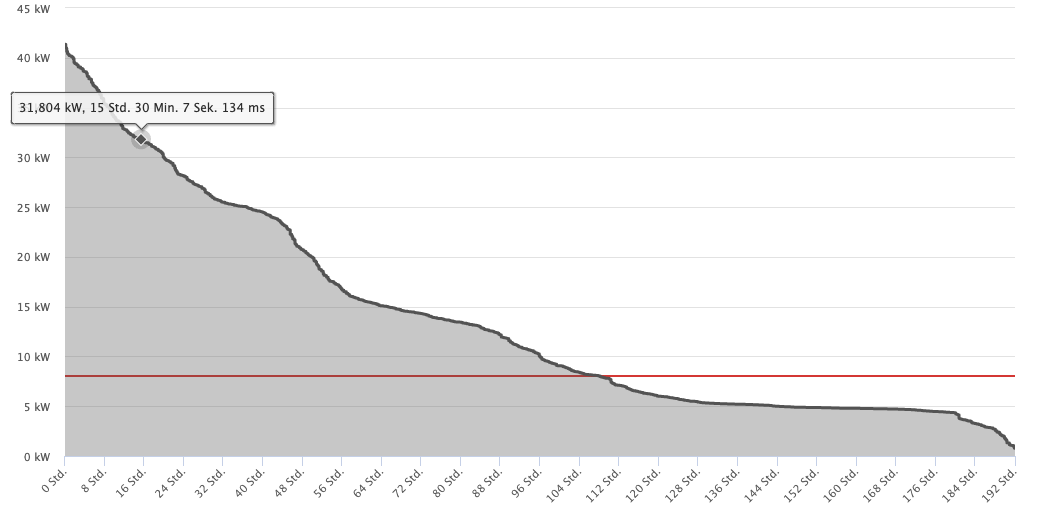
Report editor – Duration lineThe duration line is a statistical evaluation of measured values, for example to visualize load profiles. Here, the data is sorted according to its frequency in order to find out which value ranges occurred how often. In addition, the measured values can also be displayed over time.
|
Report editor |
Expert |
|
|
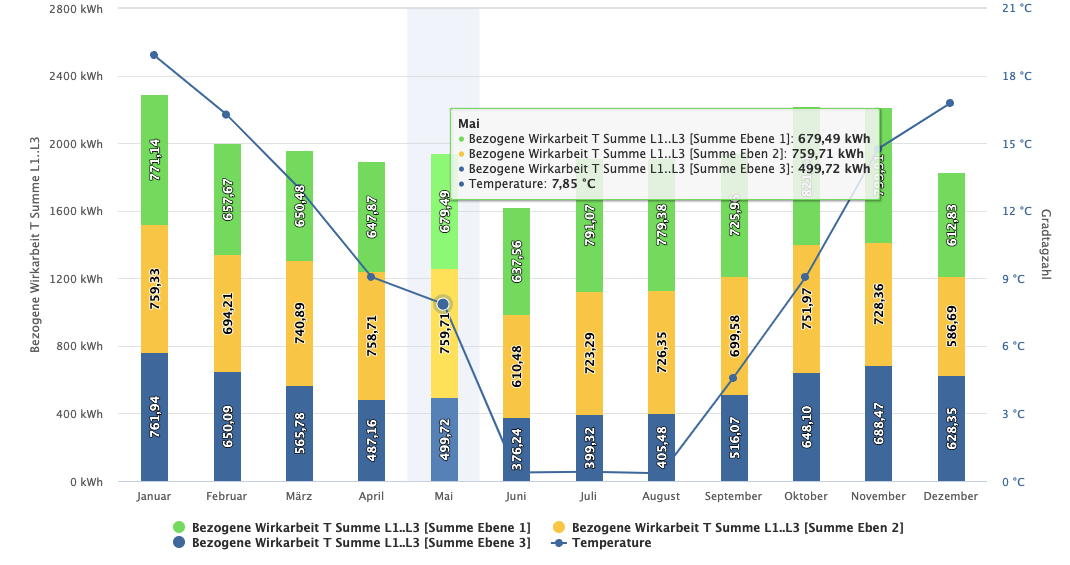
Report editor – Bar chart (stacked)With the stacked bar chart, up to 10 values of the same type can be visualized on top of each other. In addition, another value can be selected and displayed as a reference line. This reference value is displayed on a second Y-axis and can be scaled separately.
|
Report editor |
Expert |
|
|
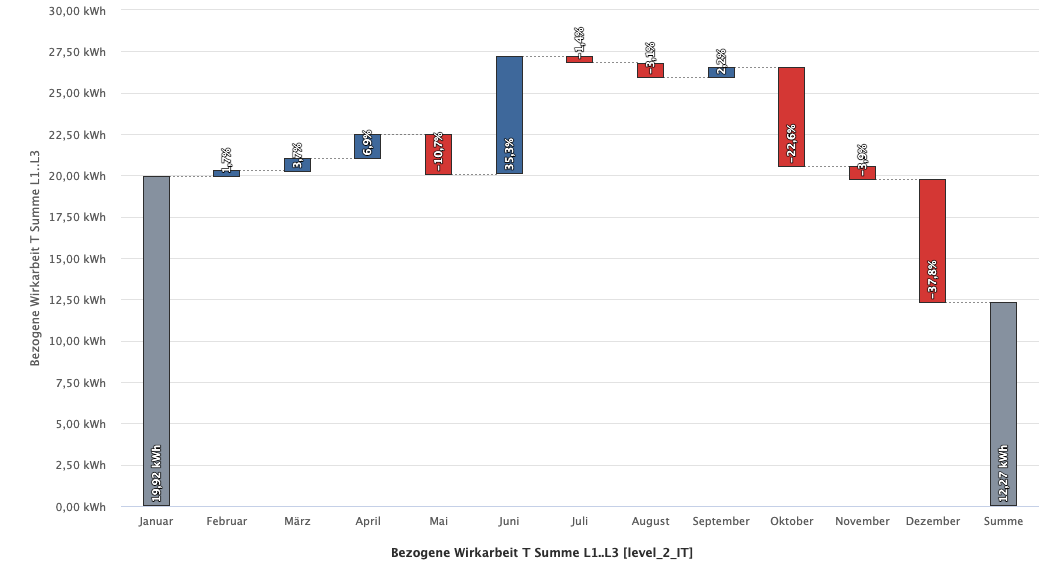
Report editor – Waterfall diagramThe waterfall diagram helps to immediately recognize how the increase and decrease of a value has occurred over time. You can choose between hourly, weekly, monthly, quarterly or annual evaluations. The changes can be displayed both in percent and in absolute values.
|
Report editor |
Expert |
|
|
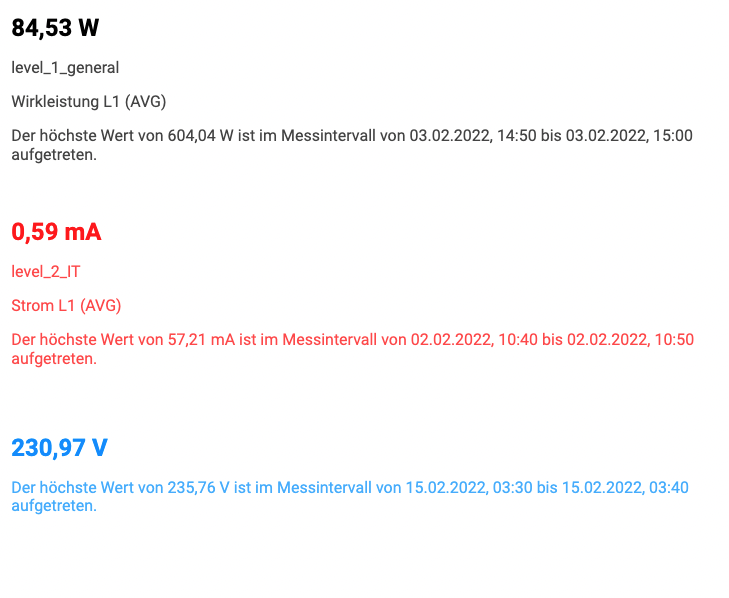
Report editor – Timestamp of the highest maximum average valuesIn the "numerical value" object there is now the possibility to display the highest value with timestamp in the selected period.
|
Report editor |
Expert |
|
|
Import and export devices to projectsWith the new import and export of devices, individual devices can be transferred from one project to another. |
Project |
Essentials, Standard, Expert |
|
|
Delivery of generic Modbus profiles from third-party manufacturersFor many third-party Modbus devices, predefined profiles can be selected and used directly. |
Generic Modbus |
Expert |
|
|
Easy assignment of generic Modbus profilesGeneric Modbus profiles can be assigned directly via the desktop device list. The extension offers an enormous time advantage during commissioning with Modbus profiles, e.g. for third-party manufacturers. |
Generic Modbus |
Expert |
|
|
Virtual device supports measured values with different time basesThe virtual device now supports measured values with different time bases. These can arise, for example, if recordings of the devices are different or if the recording density in a period is not uniform. This can occur, for example, when you compress older measurement data (database action). |
Devices |
Standard, Expert |

Optimizations and bug fixes (Changelog)
Note
After a software update a database migration must be performed (from version 8.1.20).
|
|
Short text |
Component |
Subject |
Version |
|
|
Bug fix: Memory optimization for device communication |
Devices |
GridVis Desktop / GridVis Web |
8.1.25 |
|
|
Function modification DI: MSCONS 2.4a files are supported |
Data import |
GridVis Desktop / GridVis Web |
8.1.25 |
|
|
Bug fix database action delete devices |
Databases |
GridVis Desktop |
8.1.24 |
|
|
Bug fix event browser: Waveform analysis chart was not displayed in GridVis Desktop |
Data exports/reports |
GridVis Desktop |
8.1.24 |
|
|
Bugfix: Channels were assigned incorrectly with Generic Modbus, UMG 806, RCM 202-AB, ProData I and UMG 20CM |
Devices |
GridVis Desktop / GridVis Web |
8.1.23 |
|
|
Bugfix dataexport: The data export "Consumption billing" could not be loaded in report management |
Data exports |
GridVis Desktop |
8.1.22 |
|
|
Bug Fix: Report management stability improved |
Report management |
GridVis Web |
8.1.21 |
|
|
Function optimization database: Janitza DB (update to this version requires a database migration) |
Database |
GridVis Desktop / GridVis Web |
8.1.20 |
|
|
Bug fixes RCM report UMG 801 selection |
Data exports/reports |
GridVis Desktop |
8.1.20 |
|
|
UMG 801 function upgrade: Device. module, measurement group and channel names get applied from the device in a new project |
Devices |
GridVis Desktop / GridVis Web |
8.1.20 |
|
|
Function upgrade system variables: New consumption types added |
Project |
GridVis Desktop / GridVis Web |
8.1.20 |
|
|
Function modification security: Jetty 10 update |
GridVis |
GridVis Web |
8.1.20 |
|
|
Function optimization list function: New device selection with tree structure |
Device overview |
GridVis Web |
8.1.20 |
|
|
Security update: Deprecated Apache POI was removed |
Data exports |
GridVis Desktop |
8.1.20 |
|
|
Bug fix dashboard templates: Compatibility with UMG 801 |
Dashboards |
GridVis Web |
8.1.20 |
|
|
Bug fix report editor: compatibility with UMG 801 |
Report editor |
GridVis Web |
8.1.20 |
|
|
Function upgrade OPC UA client: A server name can be entered in the path |
OPC |
GridVis Desktop / GridVis Web |
8.1.20 |
|
|
Function optimization energy values: Unrealistic values are ignored |
GridVis |
GridVis Desktop / GridVis Web |
8.1.20 |
|
|
Bug fix data exports: An error in the annual evaluation for energy costs & consumption has been fixed |
Data exports/reports |
GridVis Desktop |
8.1.20 |
|
|
Function upgrade UMG96 PQ-L: Parity and stop bit can be configured at the connections settings |
Devices |
GridVis Desktop / GridVis Web |
8.1.20 |
|
|
Bug fix report editor: Fixed a bug with the scaling of user-defined values |
Report editor |
GridVis Web |
8.1.20 |
|
|
Function upgrade device configuration: PRO device series with firmware 5.028 and higher support new configuration field "Device info" |
Devices |
GridVis Desktop / GridVis Web |
8.1.20 |
|
|
Function modification UMG 801: Change of device and module icons |
Devices |
GridVis Desktop / GridVis Web |
8.1.20 |
|
|
Function upgrade user profile: A country code an be set per user |
Project |
GridVis Desktop / GridVis Web |
8.1.20 |
|
|
Bug fix device configuration: Fixed a bug that prevented loading the device configuration with specific values of bacnet configuration |
Devices |
GridVis Desktop / GridVis Web |
8.1.20 |
|
|
Function modification MSCONS Export: AGI Segment optional usable |
Data exports/reports |
GridVis Desktop |
8.1.20 |
|
|
Bug fix system variables: Supplied active energy interval can be selected |
Data import |
GridVis Desktop / GridVis Web |
8.1.20 |
|
|
Bug fix value tree desktop: Time range no longer jumps on a change |
Devices |
GridVis Desktop |
8.1.20 |
|
|
Bug fix add devices: Added devices are placed in the correct project |
Project |
GridVis Desktop / GridVis Web |
8.1.20 |
|
|
Function upgrade web server: https security can be activated optionally |
GridVis Service |
GridVis Web |
8.1.20 |
|
|
Function upgrade system variables: Degree day number & heating degree days added |
Project |
GridVis Desktop / GridVis Web |
8.1.20 |
|
|
Bug fix Janitza ID server: Registration process is always completed |
ID server |
GridVis Desktop / GridVis Web |
8.1.20 |
|
|
Bug fix Sankey: Fixed an error that displayed an incorrect calendar week |
Sankey |
GridVis Web |
8.1.20 |
|
|
UMG 801 function upgrade: The modular measuring device is now supported in the measured value analysis and list function |
Devices |
GridVis Web |
8.1.20 |
|
|
Bug fix uptime report: Fixed an error related to the date in the failure matrix |
Data exports/reports |
GridVis Desktop |
8.1.20 |
|
|
Function upgrade utilisation report: The assured power can be entered per unit |
Data exports/reports |
GridVis Desktop |
8.1.20 |
|
|
Function modification commissioning report: The "ID" column now hows the GridVis internal device ID |
Data exports/reports |
GridVis Desktop |
8.1.20 |
|
|
Function upgrade report editor: It is no longer necessary to assign all devices in the device exchange |
Report editor |
GridVis Web |
8.1.20 |
|
|
Function upgrade report editor: In the device exchange, all devices can be retained |
Report editor |
GridVis Web |
8.1.20 |
|
|
Function upgrade report editor: If several objects are selected, a device exchange can be carried out for the selection |
Report editor |
GridVis Web |
8.1.20 |
|
|
Function upgrade Event Browser: All new eventy of the UMG96 PQ-L are supported |
Data exports/reports |
GridVis Desktop |
8.1.20 |
|
|
Bug fixed report editor: Fixed a problem with created reports and the beginning of the week |
Report editor |
GridVis Web |
8.1.20 |
|
|
Function upgrade measuring values export v2: Optionally, MIN and MAX values can now also be output |
Data exports/reports |
GridVis Desktop |
8.1.20 |
|
|
Bug fix device configuration: Fixed a bug that caused input fields of IP addresses to not be editable under certain circumstances |
Devices |
GridVis Desktop |
8.1.20 |
|
|
Function upgrade data exports: The devices can be filtered for the device type |
Data exports/reports |
GridVis Desktop |
8.1.20 |
|
|
Function upgrade utilisation report: The power reserve can be monitored |
Data exports/reports |
GridVis Desktop |
8.1.20 |
|
|
Function upgrade Event Browser: A new column is available to display the trigger of an event |
Data exports/reports |
GridVis Desktop |
8.1.20 |
|
|
Function upgrade Event Browser: Created lists can be loaded directly into the Event Browser |
Data exports/reports |
GridVis Desktop |
8.1.20 |
|
|
Function upgrade: When the report editor is started for the first time, an introductory dialogue is displayed |
Report editor |
GridVis Web |
8.1.20 |
|
|
Bug fix SQL connection handling |
Databases |
GridVis Desktop / GridVis Web |
8.1.6 |
|
|
Bug fix: Usage of Windows Certificate Store |
Installer |
GridVis Desktop / GridVis Web |
8.1.6 |
|
|
Bug fix: installer: Selecting the working memory |
Installer |
GridVis Desktop / GridVis Web |
8.1.5 |
|
|
Bug fix load project: Projects can be loaded completely again |
Project |
GridVis Desktop / GridVis Web |
8.1.4 |
|
|
Bug fix graphic Jasic editor: Fixed a bug that caused certain sequences of component editing to not save all changes in the program correctly |
Jasic |
GridVis Desktop |
8.1.3 |
|
|
Function optimization devices import: Import time improved |
Project |
GridVis Desktop / GridVis Web |
8.1.3 |
|
|
Bug fixes data import: Time conversion leads o no more data gaps |
Data import |
GridVis Desktop / GridVis Web |
8.1.3 |
|
|
Bug fixes UMG 801: Duplicate devices in SQL projects |
Devices |
GridVis Desktop |
8.1.2 |
|
|
Bug fix devices import: UMG 801 & SQL databases are supported |
Project |
GridVis Desktop / GridVis Web |
8.1.2 |
|
|
Bug fix virtual device: Handling of nested readings has been amde more robust |
Devices |
GridVis Desktop |
8.1.2 |
|
|
Bugfix measurement export: There was a problem with virtual devices |
Data exports/reports |
GridVis Desktop |
8.1.1 |
|
|
Bugfix report editor: Fixed an error with the scaling in the table object |
Report editor |
GridVis Web |
8.1.1 |
|
|
Bugfix report manager: Under some circumstances the list of reports could not be loaded |
Report management |
GridVis Web |
8.1.1 |
|
|
Bugfix report editor: Fixed an error related to power values of a virtual device in the table object. |
Report editor |
GridVis Web |
8.1.1 |
|
|
Function upgrade utilisation report: The UMG-20 CM is available in the utilisation report |
Data exports/reports |
GridVis Desktop |
8.1.1 |
|
|
Bugfix: An error in the data export energy bill in connection with tariffs was fixed. |
Data exports/reports |
GridVis Desktop |
8.1.1 |
|
|
Bugfix in recording config for UMG 96RM series, UMG 103CBM and Prodata 2 |
Recording configuration |
GridVis Desktop |
8.1.1 |
|
|
Bugfix VD can handle online recorded values |
Devices |
GridVis Desktop / GridVis Web |
8.1.1 |
|
|
Bugfix Dataexport: A problem with the UMG 801 and the energy and consumption overview was resolved |
Data exports/reports |
GridVis Desktop |
8.1.0 |
|
|
Function upgrade WEB measurement value analysis: up to 2 comparison periods can be selected |
Measured value analysis |
GridVis Web |
8.1.0 |
|
|
Bugfix DI MSCONS import: values can be used in dashboard widgets |
DI |
GridVis Desktop |
8.1.0 |
|
|
Functional upgrade key performance analysis: KPIs can be aggregated, compared with other KPIs or displayed with a comparison period |
Key figures |
GridVis Web |
8.1.0 |
|
|
Function upgrade UMG 96-PQ-L : comparators can generate custom events |
Devices |
GridVis Desktop / GridVis Web |
8.1.0 |
|
|
Bugfix REST API: counter readings are rounded correctly |
REST API |
GridVis Web |
8.1.0 |
|
|
Bugfix SQL: Ports were not closed properly |
Databases |
GridVis Desktop |
8.1.0 |
|
|
Bugfix measured value selection: Meter readings without backstop were not aggregated correctly |
Measured value analysis |
GridVis Web |
8.1.0 |
|
|
Function modification virtual device: Measured values can have different time bases |
Devices |
GridVis Desktop |
8.1.0 |
|
|
Function upgrade: Devices with modbus connection supports address range from 1 to 255 |
Devices |
GridVis Desktop / GridVis Web |
8.1.0 |
|
|
Bugfix measured value analysis: OPC UA Live values can be selected and displayed |
OPC |
GridVis Desktop / GridVis Web |
8.1.0 |
|
|
Bugfix project import: MID data are exported and imported as well |
Project |
GridVis Desktop / GridVis Web |
8.1.0 |
|
|
Function modification Installer: Installer was signed |
Installer |
GridVis Desktop / GridVis Web |
8.1.0 |
|
|
Function upgrade database Action: Import/export devices to projects |
Databases |
GridVis Desktop |
8.1.0 |
|
|
Function modification WEB measurement value analysis: Zoom and visible values remain saved when changing devices |
Measured value analysis |
GridVis Web |
8.1.0 |
|
|
Function modification data-export: The energy consumption overview has been optimized for use with the UMG 801 |
Data exports/reports |
GridVis Desktop |
8.1.0 |
|
|
function upgrade report editor: In the numerical value, the time of occurrence of the highest AVG value can be displayed |
Report editor |
GridVis Web |
8.1.0 |
|
|
Bugfix: Fixed an error within measurement export V2 with too many measurement values |
Data exports/reports |
GridVis Desktop |
8.1.0 |
|
|
Function modification: The column-header is now displayed fixed |
Data exports/reports |
GridVis Desktop |
8.1.0 |
|
|
Function upgrade report editor: new object duration line |
Report editor |
GridVis Web |
8.1.0 |
|
|
Bugfix database Migration process: Before a migration, a note appears in the desktop project tree |
Databases |
GridVis Desktop |
8.1.0 |
|
|
Function modification WEB List function: Measured value analysis and device configuration can be opened in a separate tab with a right click |
Device overview |
GridVis Web |
8.1.0 |
|
|
Bugfix WEB measurement value analysis: CSV export no longer outputs duplicate values |
Measured value analysis |
GridVis Web |
8.1.0 |
|
|
Function modification WEB measured value selection: Consumptions can also be displayed without aggregation |
Measured value analysis |
GridVis Web |
8.1.0 |
|
|
Function modification WEB measurement analysis: same units can optionally be combined in the graph |
Measured value analysis |
GridVis Web |
8.1.0 |
|
|
Bugfix data export LET report: limits can be edited again |
Data exports/reports |
GridVis Desktop |
8.1.0 |
|
|
Function upgrade UMG 96-PQ-L: comparators can generate custom events |
Devices |
GridVis Desktop / GridVis Web |
8.1.0 |
|
|
Function modification WEB measured value selection: Aggregation function has been deactivated for meter readings and is always set to MAX |
Measured value analysis |
GridVis Web |
8.1.0 |
|
|
Bugfixes AD: SSL certificate import. |
Active Directory |
GridVis Desktop |
8.1.0 |
|
|
Function modification report editor: shortcut behavior was optimized |
Report editor |
GridVis Web |
8.1.0 |
|
|
Function upgrade report editor: new Menu in report editor to open certain functions |
Report editor |
GridVis Web |
8.1.0 |
|
|
Function modification WEB List function: Limit value filters can be stored with decimal places |
Device overview |
GridVis Web |
8.1.0 |
|
|
Bugfix database MSSQL: Fixed a problem with MSSQL databases and certain strings |
Databases |
GridVis Desktop |
8.1.0 |
|
|
Bugfix Data export utilization report: no more errors with deleted devices |
Data exports/reports |
GridVis Desktop |
8.1.0 |
|
|
Function modifiaction database: Performance for queries was improved |
Datatabases |
GridVis Desktop |
8.1.0 |
|
|
Bugfix Data export Utilization report: UMG 801 4th channel can be used |
Data exports/reports |
GridVis Desktop |
8.1.0 |
|
|
Function upgrade report editor: report export includes also images and graphics |
Report editor |
GridVis Web |
8.1.0 |
|
|
Function upgrade report editor: Object Numeric value can show highest/lowest value |
Report editor |
GridVis Web |
8.1.0 |
|
|
Function upgrade report editor: new visualization object stacked bar chart with reference line |
Report editor |
GridVis Web |
8.1.0 |
|
|
Function upgrade report editor: new object waterfall diagram |
Report editor |
GridVis Web |
8.1.0 |
|
|
Function modification report editor: objects show when the displayed amount of data is too large |
Report editor |
GridVis Web |
8.1.0 |
|
|
Function upgrade WEB measurement value analyses: aggregated consumptions can be drawn as bars |
Measured value analysis |
GridVis Web |
8.1.0 |
|
|
Function upgrade reporteditor: new object Heatmap |
Report editor |
GridVis Web |
8.1.0 |
|
|
Bugfix Online Recorder: sporadic bugs in UI removed |
Online Recorder |
GridVis Web |
8.1.0 |
|
|
Function upgrade WEB measurement value analysis: new foldable sidebar with extended display functions |
Measured value analysis |
GridVis Web |
8.1.0 |
|
|
Function upgrade licensing: licensing can be started in the Service via a web browser |
License |
GridVis Desktop / GridVis Web |
8.1.0 |
|
|
function upgrade license overview: possible installable release is displayed |
License |
GridVis Desktop / GridVis Web |
8.1.0 |
|
|
Function upgrade Device list export desktop: Modbus profiles can be assigned directly for generic Modbus devices |
Generic Modbus |
GridVis Desktop |
8.1.0 |
|
|
Function upgrade generic Modbus: Third party profiles are included |
Generic Modbus |
GridVis Desktop |
8.1.0 |
|
|
Function upgrade device configuration in WEB: new navigation bar |
Devices |
GridVis Web |
8.1.0 |
|
|
Function modification ID server: License user see only their own projects |
ID server |
GridVis Desktop / GridVis Web |
8.1.0 |
|
|
Bugfix Report editor: Fixed a bug where locked objects could be moved by multiple selection |
Report editor |
GridVis Web |
8.1.0 |
|
|
Bugfix Report Manager: Fixed an error where the link to the most recent document was not correct |
Report management |
GridVis Web |
8.1.0 |


Subject to technical changes.
The content, performance features and diagrams provided in the software description are not always reflective of the actual cases and will change, e.g. with the ongoing development of the software. The content has been compiled with utmost care and is based on the latest information available to us. Errors cannot be excluded.
The desired performance features and delivery conditions are only binding if these are expressly agreed upon when the contract is concluded.
The trade names, brand names and trade descriptions are subject to the guidelines of the respective manufacturer. Janitza electronics GmbH does not guarantee to keep this software description up-to-date. For further current information and specifications, see
www.janitza.com
.