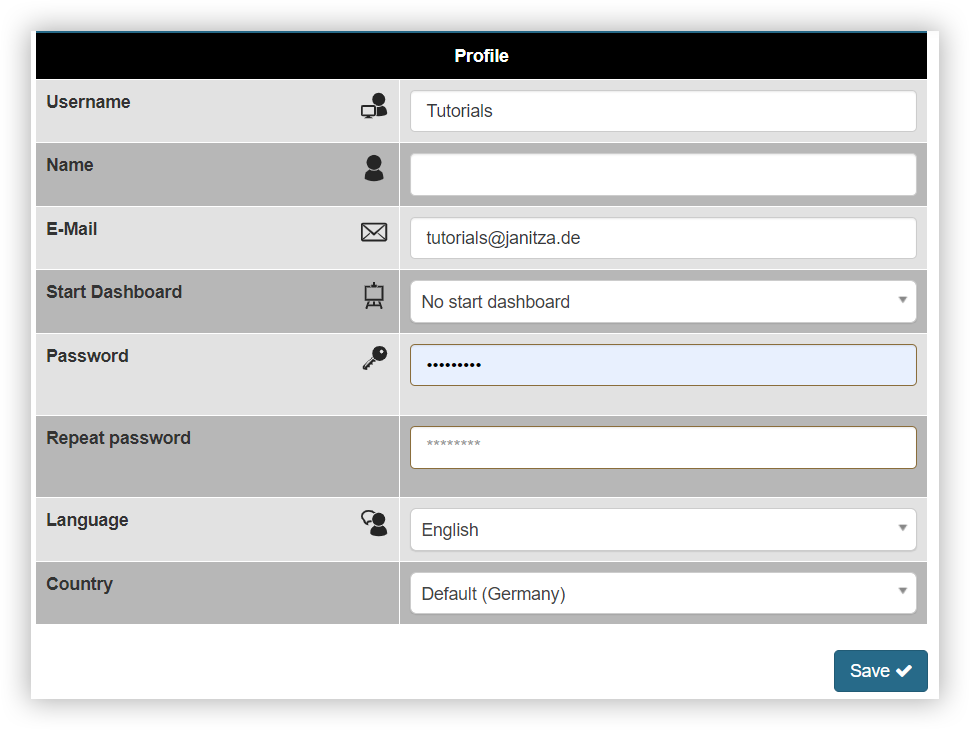
Profile (User settings)
Valid for
|
GridVis editions |
Software platform |
|
|
|

On the Profile page, you can change your personal details such as user name, name and e-mail. You can find the page under Settings > User settings. Please note that changes can only be made with the appropriate rights. You can also define the following settings:
Start dashboard: Determines which dashboard is displayed after logging in or after clicking on the Home button in the top menu bar.
Language: Specifies the language in which the GridVis is displayed. German, English, Italian and Spanish are currently supported.
Country: Specifies the country in which you are using GridVis. The country affects certain country-specific settings such as the first day of the week.
Note
If you change your password, it must fulfill the following conditions:
It must be between 8 and 20 characters long.
It must contain at least one special character and one number.
It must contain at least one lowercase letter and one uppercase letter.
Attention!
Keep username and password safe! Without access data, only the admin user can implement changes!