Roles and Rights
Active Directory roles and permissions
In the user administration you can assign Roles with corresponding Rights to users.
Users and Roles (group of rights) can be created, assigned and managed in the User Editor .
Note
The User administration function in the GridVis is subject to constant revision. As a result, the Roles and the rights of the users change, too. You can find the most up-to-date list of roles and rights in the user interface of your GridVis.
The GridVis Web (Standard, Expert) allows you to configure and organize user directories and their roles (rights).
Import and export functions in the User administration of your GridVis Desktop enable the exchange of user directories between GridVis Web and GridVis Desktop.
In the table below you will also find roles (rights) that were tailored to GridVis Web and added to the User administration (GridVis Desktop).
To view a complete list of the roles (Roles window in the GridVis) with your rights, proceed as a user with limited rights as follows:
After you have created the GridVis administrator as a user, log in with your User Name and Password to your GridVis project (User administration overview window > user actions > Login).
After you have successfully logged in, in the window User Editor under the entry Roles, click on the button "..."
The window Roles will appear.
To view the rights of the individual roles, click on the button "..." in the corresponding Role Line (see fig. on the right).
The window Rights will open.
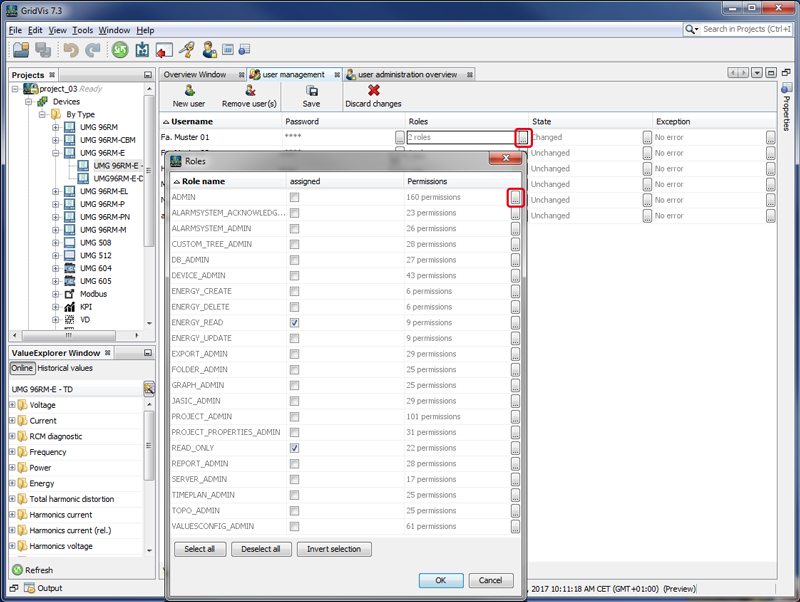
The following table shows excerpts of the roles with their most important rights:
|
Roles |
Excerpts of the most important rights from the roles |
|
ADMIN |
Administrator of the GridVis.
|
|
ALARMSYSTEM_ACKNOWLEDGER |
Users with the role Administrator for confirming the alarm system.
|
|
ALARMSYSTEM_ADMIN |
Users with the role Administrator for the alarm system.
|
|
CUSTOM_TREE_ADMIN |
Users with the role Administrator for a user-defined tree structure.
|
|
DB_ADMIN |
Users with the role Administrator for the area of databases. |
|
DEVICE_ADMIN |
Users with the role Administrator for the area of devices.
|
|
ENERGY_CREATE |
Users with the role ENERGY_CREATE have these rights:
|
|
ENERGY_DELETE |
Users with the role ENERGY_DELETE have these rights:
|
|
ENERGY_READ |
Users with the role ENERGY_READ have these rights:
|
|
ENERGY_UPDATE |
Users with the role ENERGY_UPDATE have these rights:
|
|
EXPORT_ADMIN |
Users with the role Administrator for the area of export"
|
|
FOLDER_ADMIN |
Users with the role Administrator for the area of directories.
|
|
GRAPH_ADMIN |
Users with the role Administrator for the area of graphs.
|
|
JASIC_ADMIN |
Users with the role Administrator for the area of Jasic.
|
|
PROJECT_ADMIN |
Users with the role Administrator for the project. Have the same rights as the Administrator, but cannot create and manage other users. |
|
PROJECT_PROPERTIES_ADMIN |
Users with the role Administrator for project properties. Have, in addition to the basic rights READ_ONLY, the right to activate and manage project properties. |
|
READ_ONLY |
Users with Basic Rights to Read |
|
REPORT_ADMIN |
Users with the role Administrator for the area of reports.
|
|
SERVER_ADMIN |
Users with the role Administrator for the area of servers.
|
|
TIMEPLAN_ADMIN |
Users with the role Administrator for schedules.
|
|
TOPO_ADMIN |
Users with the role Administrator for the area of topology.
|
|
VALUESCONFIG_ADMIN |
Users with the role Administrator for the area of value configuration.
|