User Management - Description
Description
For the Standard edition and higher, the GridVis features User administration (a user directory).
In the GridVis user administration, you can assign Right" and Roles (group of rights) to each user of your projects. You create Users and assign them Rights and roles (cf. Roles and Rights ).
You select one user as Admin, who is assigned all of the Rights in the GridVis.
The Admin manages the users, projects, devices, topologies, etc. The Admin can delete and add without any restrictions.
Every project in the GridVis can be protected with user administration. You can activate the protection of a project using user administration in the Project Properties (cf. User administration - Protect Project ).
For each project in your GridVis there is only one user administration (a user directory).
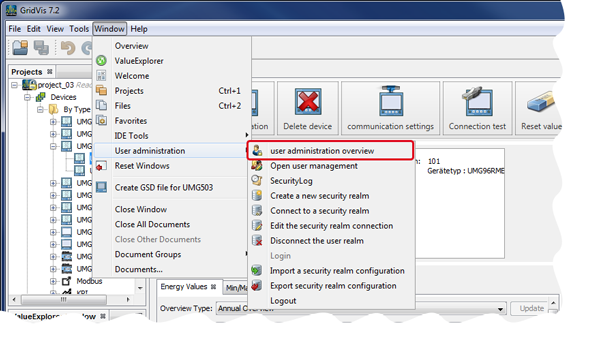
All of the users, passwords, rights and roles exist in one user database (a user directory). You can create the user directory in the GridVis under the menu entry Window > User administration > Create a new security realm.
The roles (groups of rights)
- contain the respective rights for the users.
- cannot be configured.
- are additive, i.e. rights of users from different roles are added.Projects with user administration (user directory) require a login.
The Essentials GridVis edition does not have user management.
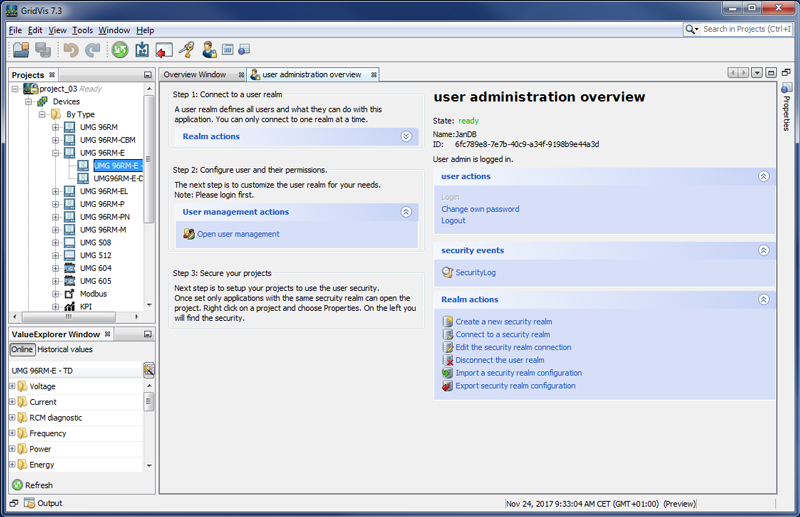
You can open the User administration overview window by clicking on the User administration overview button in the submenu User administration of the menu entry window in the GridVis software user interface.