Data Import (DI) - Configuration
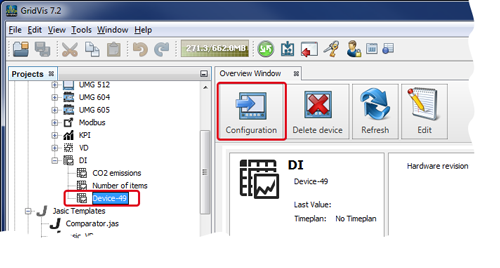
Mark your MI device in the window Projects.
Single-click on the window Configuration to open the Configuration window of your DI device.
or
Right-click on the DI device to open the context menu.
In the context menu, click on the entry Configuration.
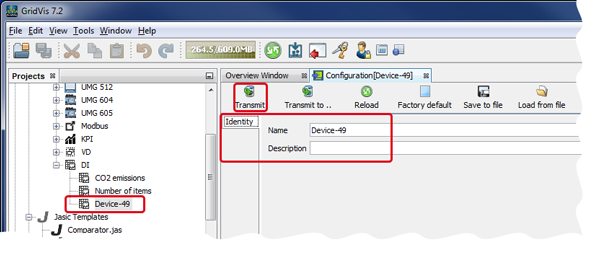
In the entry fields in the configuration window of your DI device, enter a Name and a Description.
Then click on the button Transfer in the symbol bar of the configuration window.
the window Information will open with the message Changes were Saved.
Confirm by clicking on the button OK.
The system transfers the Name and the Description to the MI device in your project.
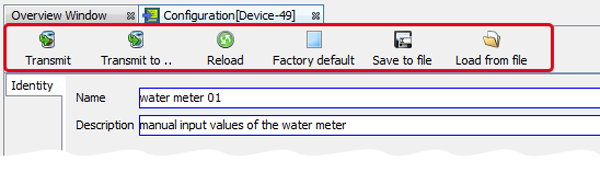
Function of the buttons in the symbol bar of the DI device configuration window.
|
|
Button/Symbol |
Description |
|
1 |
|
Transfers data changes to the device. |
|
2 |
|
Transfers data changes to the device via a dialog box. |
|
3 |
|
Reloads data, e.g. after changes that should be undone. |
|
4 |
|
Sets the device settings back to the factory presets. Please note: This may interrupt the connection to the device! |
|
5 |
|
Saves all device settings in a txt file (text file). |
|
6 |
|
Loads all device settings from a txt file. |


