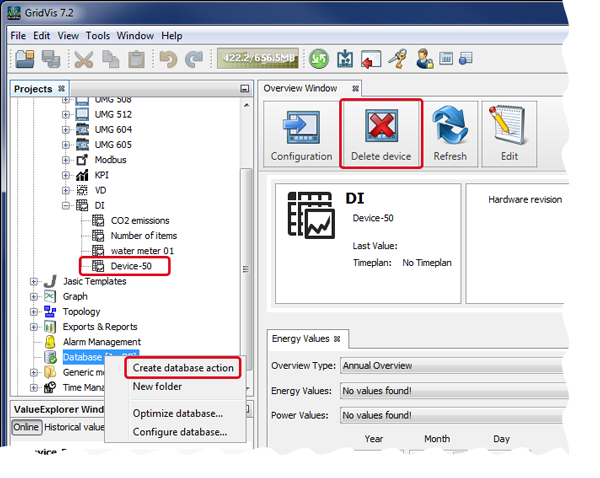
Data Import (DI) - Delete Device
Single-click on the button Delete Device to delete the marked DI device in the Projects window from your project with a security query.
Note
The system marks the device as deleted in the database, but the previously collected data and the device remain in the database!To delete the device with the previously collected data permanently, proceed as follows:
In the window Projects, right-click on the entry Database.
The context menu opens.
Click on the entry New Database Action in the context menu.
The window Create New Database Action opens.
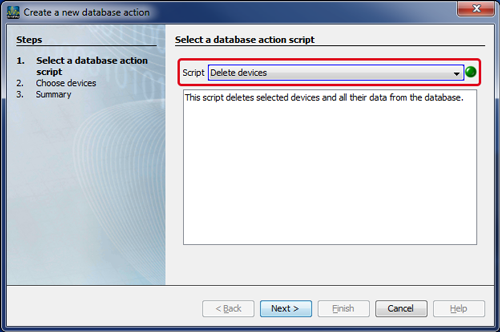
In the first step, choose Select Database Action in the options list Script the entry Delete Devices.
Note
The script Delete Devices deletes the selected devices permanently with their measurement values from the database.
Click on the button Continue.
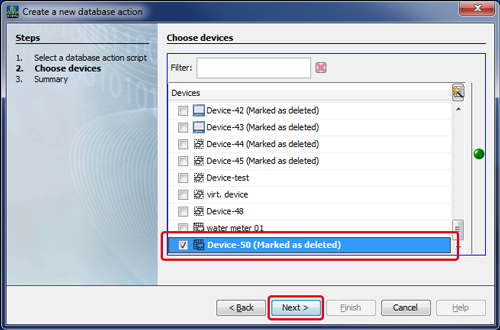
The second step,Select Devices, opens in the window Create New Database Action.
Mark the checkbox of the device you would like to delete.
Click on the button Continue.
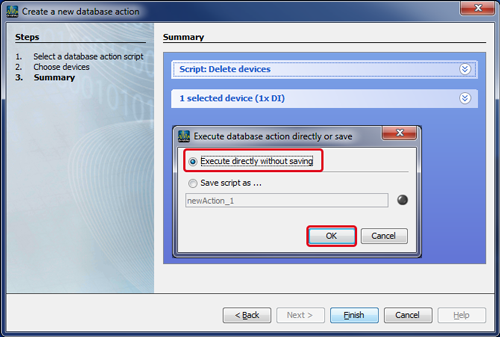
The third step, Summary, opens in the window Create Database Action.
Click on the button Done.
In the query window that opens, mark the radio button Execute Directly without Saving.
(The second option Save Script in.."saves a script Database Action in your project).When you click on the button OK the system deletes your device with all measurement values from the project and from the database.