Example: Sending e-mail
Sending an email with a UMG 604 in the event of an undervoltage of <200 V in phases L1, L2 or L3.
Recipient's address : martin.musterman@server.de
Sender address: umg604@gmx.de
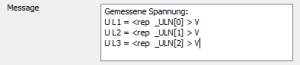
Additional information: Voltage values from the 3 phases at the time of the undervoltage
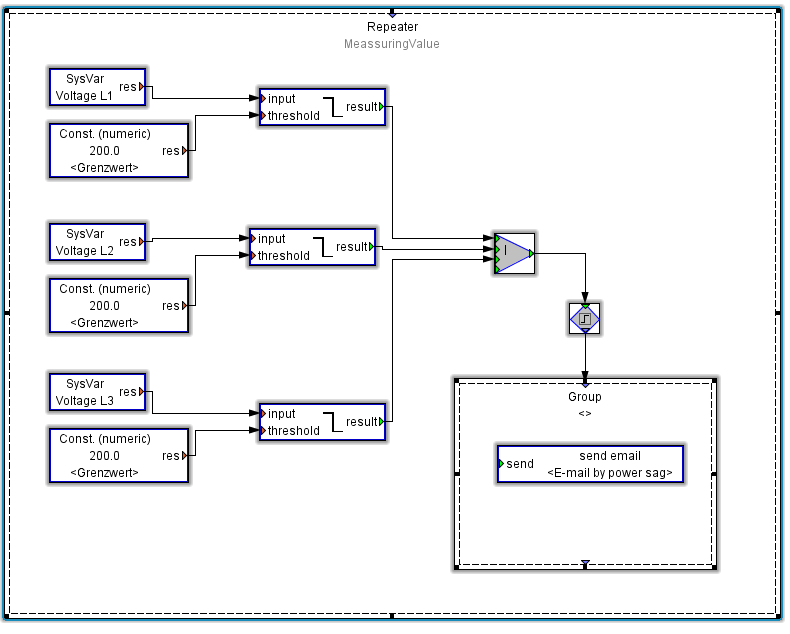
Create the JAISC program as shown in the following graphic (see JASIC start ).
Required components provided in the Palette window:
Repeater, group, system variables, constants (numeric), comparator above the threshold value, Boolean OR links 4xOn, flank trigger sequence control and email outbox.Assign the respective voltages to the system variables and assign desired value to the constants (in this case 200 V).
Establish the connections between the components.
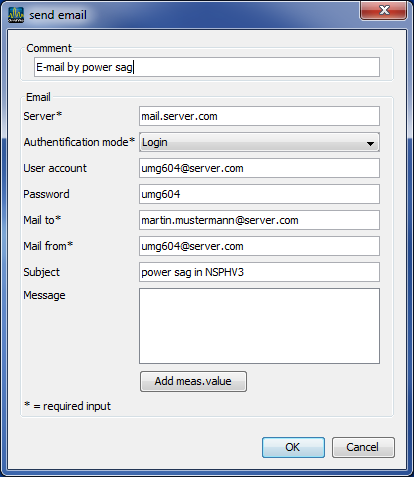
Open the Send email module by double-clicking and configure this with:
information about your outgoing mail server (server, authentification mode, user and password),
with the recipient's e-mail,
with the sender address, the subject line and the content of the respective e-mail.
Information about your outgoing mail server and the authentication mode can be obtained from your mail provider or by your system administrator.
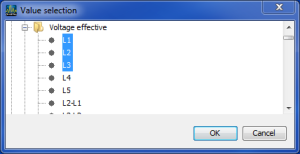
Using the Add measurement values button, select the voltages L1, L2 and L3 for the email attachment.
Drag the selected measurement values to the email messages field.
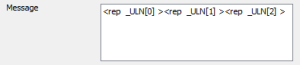
You can now insert further text in the message.
Save the program for use
via the button Transmit or Transmit to.. on the UMG 604 or
via Save as a JASIC template or
via Save as as a file on your computer.