Example: Reading out Modbus slave
Reading out from a UMG 103 using a UMG 604 with GridVis.
The Communication programming element module is required for the graphic programming of Modbus devices. This includes the elements Read/write Modbus or Profibus.

Create the JASIC program (see JASIC start ).
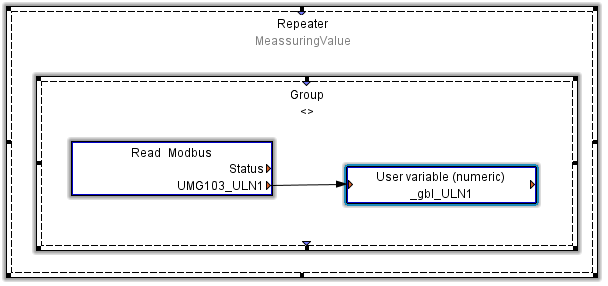
Required components provided in the Palette window: Repeater, group, read Modbus, user variable (numeric).
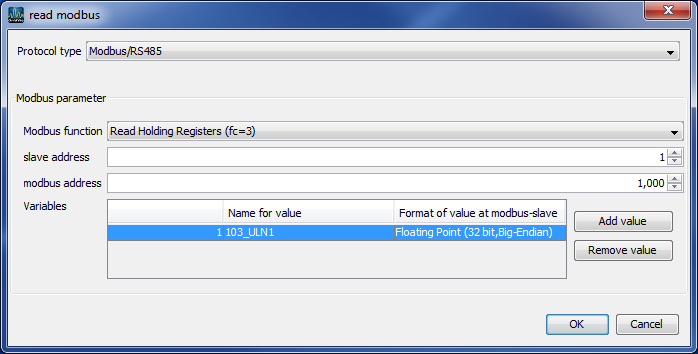
Configuration of the read Modbus function:
Modbus function
We use the Modbus function Read holding registers (fc=3) to read a value.Slave address
Device address of slave. Here it is the UMG 103 address.Modbus address
In the Modbus address list for the UMG 103, you will find the corresponding Modbus address for each measured value.Variables
Add a variable via the Add value button.
Assign the variable a name and select a format for the variable in accordance with the Modbus address list.
Expand the variable list accordingly if other required variables follow the selected Modbus address directly.
A new read Modbus function has to be added and configured for variables that do not come directly after the following variable addresses.
The Modbus functions used must be supported by both devices.
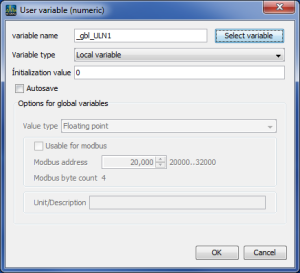
Configuration of the User variable function:
Variable name
The variable name must start with _gbl if this variable is to be used as a Global variable.Variable type
The variable must be a Global variable type, in order to facilitate its access by other programs.Available for Modbus
In the UMG 604, the Modbus address range 20000-32000 is reserved for user-defined variables.
We have assigned the variable _gbl_ULN1 used in our example to the available address 20000.
The next free address is 2004.