RCM report - Example


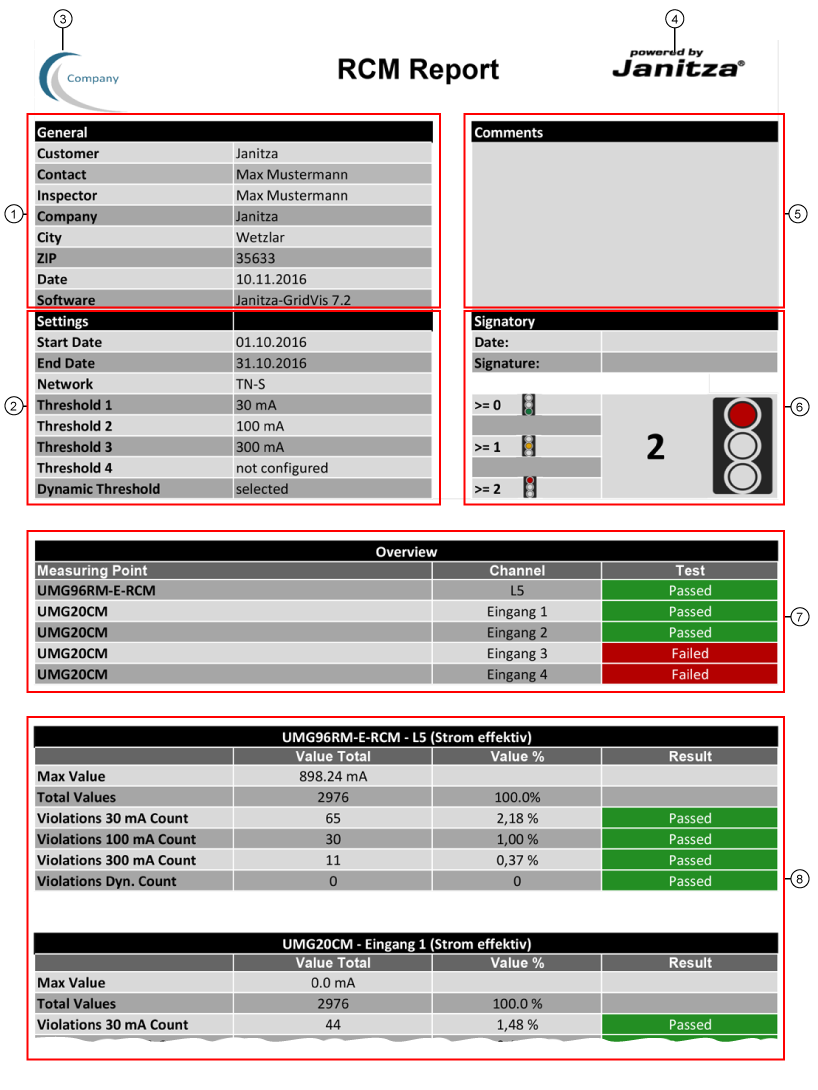
Example - Excerpt of the PDF export CM Report:

images/download/attachments/251037028/RCM_Report-version-1-modificationdate-1517402454000-api-v2.png


Pos.

Description

1

Entries (cf. step Labeling and Design in RCM report ):

  • Client, contact, responsible person.

  • Company, address (city, postal code).

  • Date created.

  • Software, version.

2

RCM report recordings (cf. step Selection Time Range and Thresholds in RCM report ):

  • Starting time point.

  • Stopping time point.

  • Network system.

  • Thresholds 1 - 4.

  • Dynamic threshold.

3

Logo, e.g. Client of the RCM Report (cf. step Labeling and Design in RCM report ).

Formats: tiff, gif, jpg and png.

4

Logo of the organization/company that performs the RCM report (integrated in the design templates).

5

Comment field (cf. step Labeling and Design in RCM report ).

6

Fields for date and signature

  • Depending on the set number of Measurements with Threshold Violations, the corresponding traffic light will appear in the RCM report (see step Evaluation in RCM report ).

7

Shows all of the measurement sites (measuring devices) with the status of threshold violations for the respective measurement channel:

  • Green - Test passed - Measurement points (measurements) inside the thresholds.

  • Red - Test not passed - Measurement points (measurements) with threshold violations.

8

Shows measurement sites (measuring devices) with measurement values and the details:

  • Maximum value.

  • Total number of measurement points (that were measured in the set timeframe - absolute and relative value).

  • Number of threshold violations (absolute and relative value) of the first to the fourth threshold (depending on the configuration of the step Thresholds in RCM report ).

  • Number of threshold violations (absolute and relative value) of the dynamic threshold (cf. step Thresholds in RCM report ).