Layout Page

Layout Page
A layout page is used to design a page template that is used for all devices linked to the layout page. For each linked device, a device page is created automatically on which the
objects
are filled with the values from the respective device. Objects on layout device pages can only be edited on the parent layout page.
What is known as the layout device is available when configuring measured values of the objects on a layout page. The layout device contains the measured values that are available in all devices linked to the layout page. On the device pages, objects with measured values of the layout device contain the data of the device belonging to the respective device.
The layout page itself does not appear in the report and has no page number.
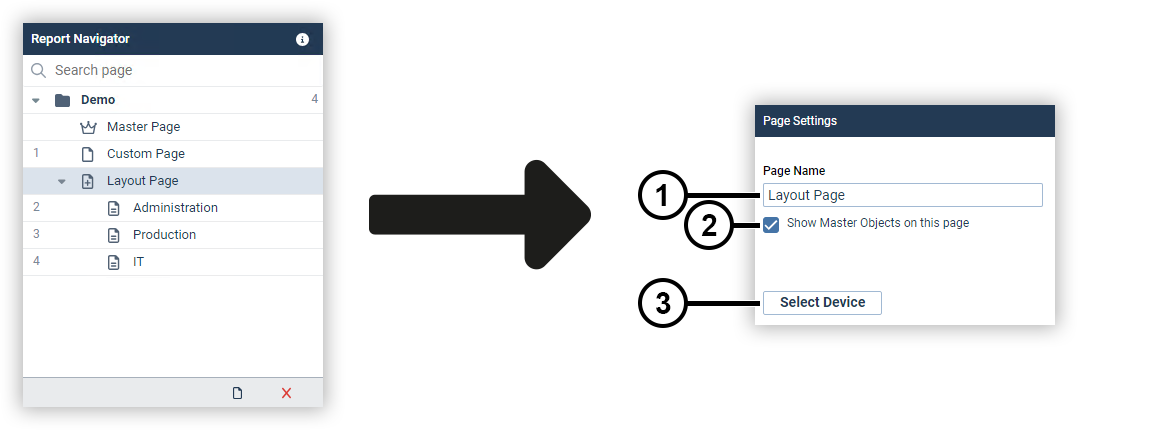
|
Position |
Description |
|
1 |
Defines the page name. |
|
2 |
Displays objects of the master page on the layout page and all device pages. |
|
3 |
Opens the device selection window. |
Layout Device Page
A layout device page is automatically created for each device linked to the parent layout page. On this device page, the objects of the layout page are filled with the values of the respective device.
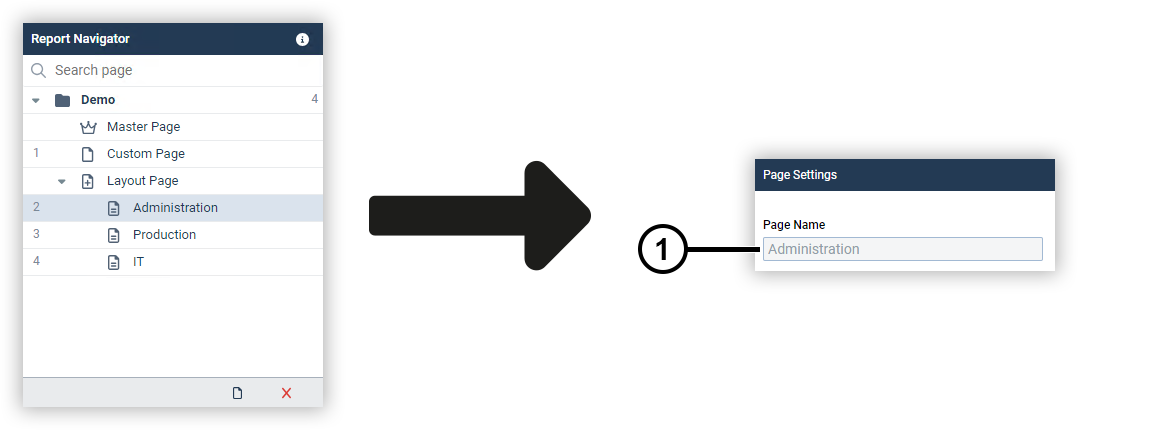
|
Position |
Description |
|
1 |
Displays the page name. Note The page name of the layout device page corresponds to the device name and cannot be changed. |