Voltage transformer
If you use voltage transformers, you must enter the transformer ratio here.
Settings
Voltage connection L1 .. L3
Measuring mode
The Voltage transformer configuration card can be shown or hidden depending on whether you are working with or without voltage transformers.
Click on a voltage connection L1-L3 in the device image.
The Measuring mode drop-down list is displayed.To show the Voltage transformer configuration card, select Voltage transformer from the drop-down list.
To hide the Voltage transformer configuration card, select Direct connection from the drop-down list.
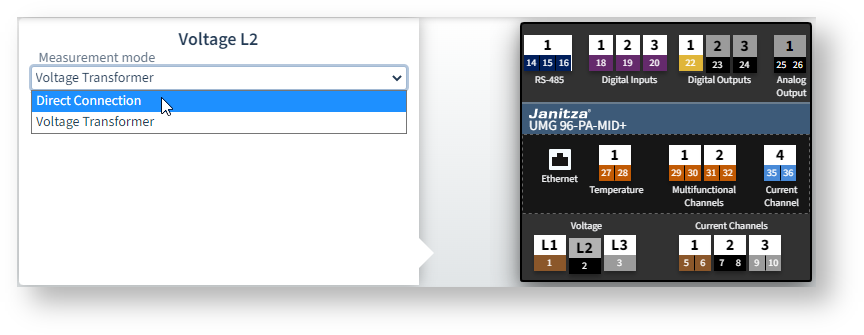 Example image: UMG 96-PA-MID+
Connection *
If you have swapped the phases when connecting, you can correct the phase assignment here.
Note
* This setting is only available on measurement devices of the PQ-L series.
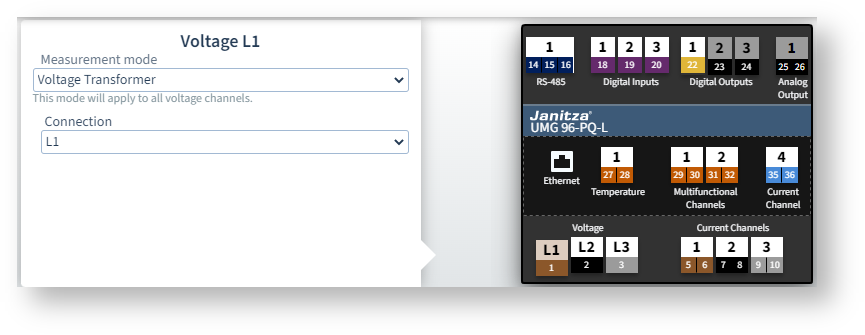 Example image: UMG 96-PQ-L
Main measurement L1-L3
The ratio of the voltage transformers must be identical for all three phases.
Primary
Specify the input voltage according to the rating plate of the voltage transformer.
Secondary
Specify the output voltage of the voltage transformers, i.e. the voltage applied to the measurement device at terminals L1-L3.
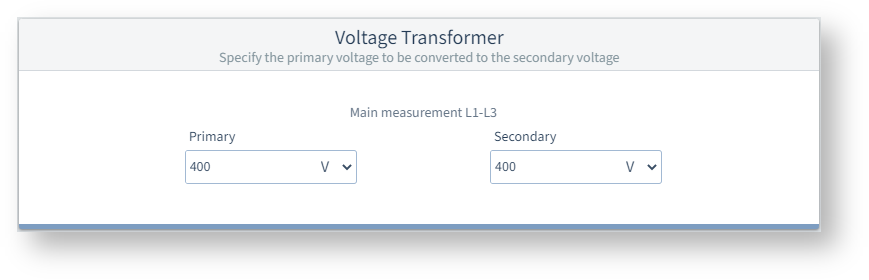
Example image: UMG 96-PA-MID+
DC measurement L6 *
If Measuring mode = DC power is selected for multifunction channel L6 (terminals 31+32), enter the transformer ratio here.
Note
* This setting is available only if the measurement device is equipped with the 96-PA-RCM-EL module.