Time
The time the measurement device uses in operation can be synchronized with the actual time either manually or automatically.
Especially when measured values from several measurement devices are evaluated, it is important that all measurement devices have the same time.
Settings
Synchronize device time
Click the Synchronize device time button to transfer the UTC time from the PC to the measurement device manually once.
Click the diskette icon to transfer the new time to the measurement device.
Note
To ensure the device time is always accurate, turn on Activate NTP, then the device time will be automatically synchronized with a time server on a regular basis. Manual synchronization is then no longer necessary.
Time zone
Select the time zone in which the measurement device is installed.
When the correct time zone is selected, the summer/winter time change is automatic.
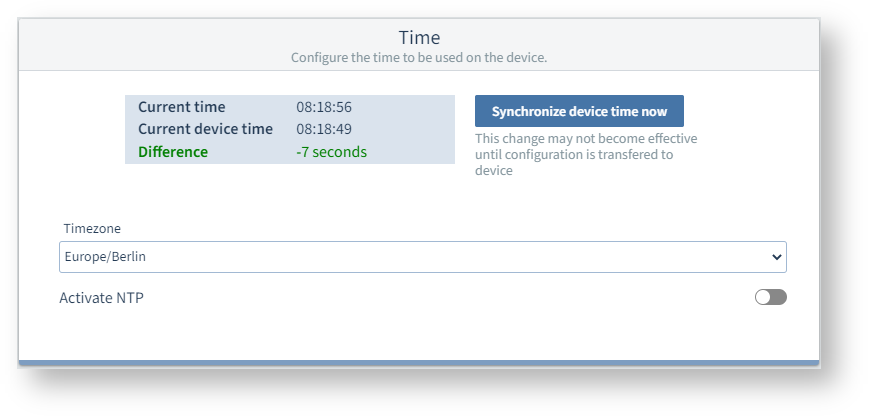 Example image: UMG 96-PQ-L
Activate NTP
Prerequisite: The measurement device (with module) has an Ethernet connection.
When NTP (Network Time Protocol) is activated, the measurement device can obtain the time automatically on a regular basis.
Enter the Internet address of an NTP server from which the measurement device is to obtain the time.
Note
For higher accuracy it is important that the NTP server used be close by.
If NTP is not enabled, there may be other options for time synchronization depending on the features with which the measurement device is equipped, or you can synchronize the time manually.
Enable time setting of the slave devices (1-31) *
Prerequisite: NTP must be activated.
The setting for Communication > RS-485 must be Modbus Master(Gateway).
The set number of slave devices adopt the time from the NTP server.
Note
* This setting is only available for measurement devices of the type PA-MID+.