Display settings
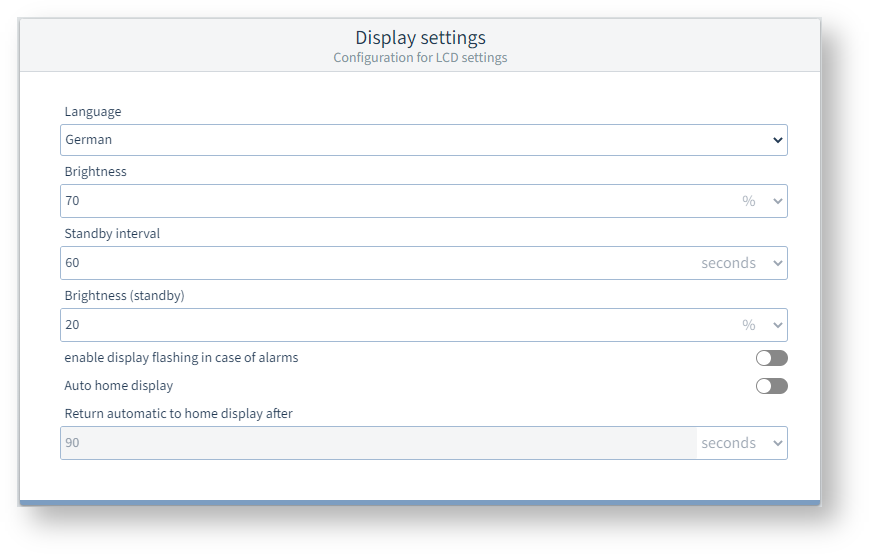
These settings allow you to adjust the display to suit ergonomic needs. Reducing the brightness also saves some energy and can extend the service life of the display.
Settings
Language
Set the language for the measurement device display here.
Brightness
This percentage value indicates the brightness in normal operation, i.e. when using the buttons or after the time set under Standby after has elapsed.
Standby after
After this time, the display switches to the brightness level set under Brightness (standby). The shortest time that can be set is 60 seconds.
Brightness (standby)
After the standby time has elapsed, the display switches to this brightness level. Even at 20% brightness, the display is still sufficiently legible in normal ambient light.
Allow display flashing in case of alarms
When this setting is turned off, alarms are displayed in the header as a red or yellow banner.
If this setting is on, the display will also flash in case of an alarm or warning.
Example image: UMG 96-PQ-L
Auto home display*
When this setting is switched on , the measurement device will display the start screen after the time set under Home display after has elapsed.
If this setting is off , the current display will continue to be shown until another display is opened.
Home display after*
After this time, the display changes to the start screen.
Note
On the UMG 96-PA-MID+, these two settings are not available, because they are permanently active. The start screen is displayed after 90 seconds.
On the UMG 96-PA and UMG 96-PQ-L, you can define any screen as the start screen by pressing button 2, Home , for a longer time.