Time synchronisation
Deviations may occur between the device time and the PC time. The time can be synchronized manually or automatically via GridVis Desktop.
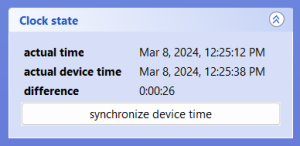
Synchronize time manually
Open the overview window of a device.
Click on synchronize device time in the Clock State area on the right-hand side of the overview window.
Valid for
|
GridVis editions |
Software platform |
|
|
|


Synchronize time automatically
Select at least one device in the project window or overview window.
Select multiple devices in the project window by holding down the Ctrl key and using the checkboxes in the overview window.
Right-click on the selected devices and select Configure time synchronisation in the context menu.
Select a schedule and confirm the time setting with OK.
Note
If a schedule does not yet exist, this can be configured by selecting Add schedule (cf. Time Management ).
Valid for
|
GridVis editions |
Software platform |
|
|
|