Alarm Plans
New Alarm Plan
Edit Alarm Plan
Alarm Plan - Escalation Levels
Alarm Plan Delete
Alarm plan Update
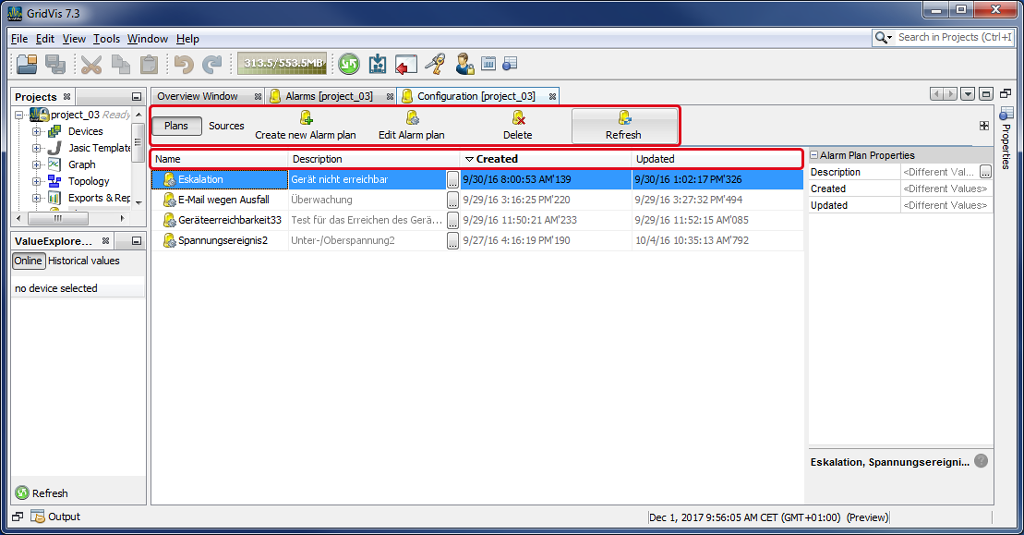
The window (Alarm) Configuration shows an overview of the alarm plans when the button Alarm Plans is activated.
You can edit and manage the alarm plans using various buttons in the Configuration window.
|
Pos. |
Alarm plan management - |
Description |
|
1 |
|
Click on the button Alarm Plans to see all of the relevant buttons and categories for creating, managing and editing the Alarm Plans. |
|
2 |
|
In this case, the button Alarm Sources is inactive. |
|
3 |
|
Single-click on the button:
|
|
4 |
|
Single-click on the button:
|
|
5 |
|
Single-click on the button:
|
|
6 |
|
Single-click on the button:
|
|
|
Alarm plan properties - |
Button properties/description |
|
7 |
|
Alarm plan name. |
|
8 |
|
Description of the alarm plan. |
|
9 |
|
Time and date the alarm plan was created. |
|
10 |
|
Time and date the alarm plan was updated. |


