|
1
|
|
|
2
|
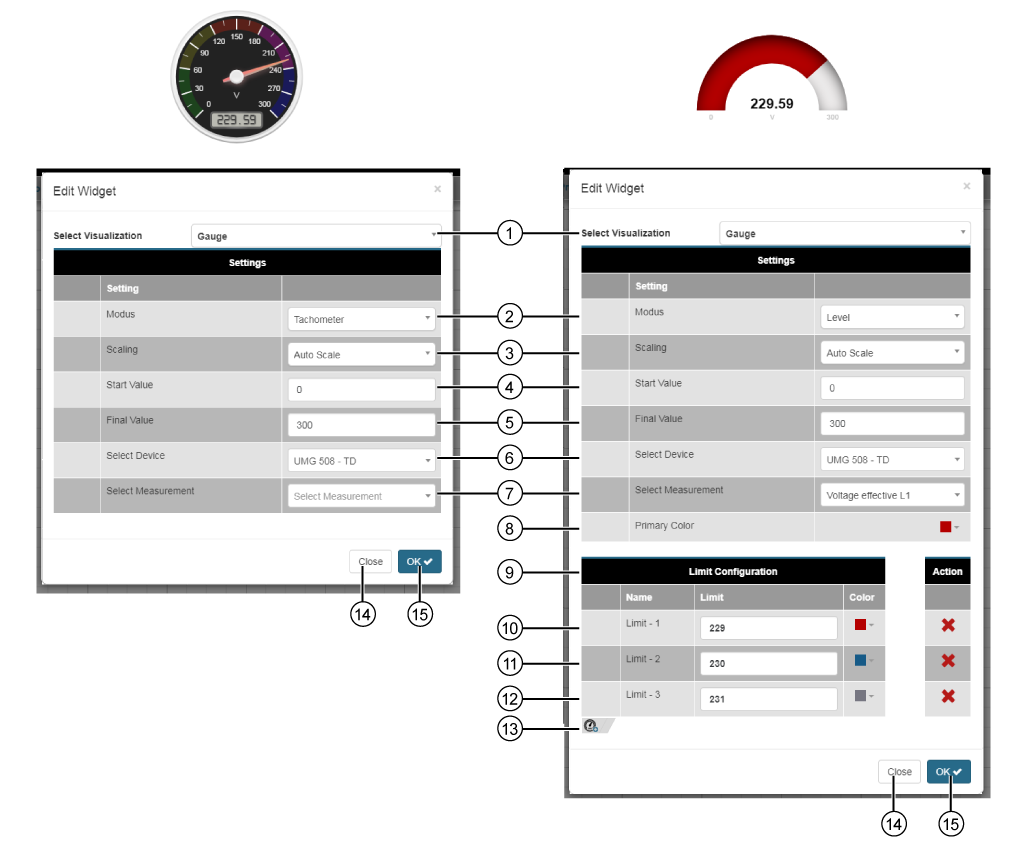
2 mode options:
|
|
3
|
Settings can be chosen depending on the quantities:
Automatic scaling
No scaling
Milli (m)
Kilo (k)
Mega (M)
Giga (G)
|
|
4
|
Configurationof a starting value for the widget. The starting value = 0, for
no or
indecipherable entries.
|
|
5
|
Configurationof a final value for the widget. The final value = value of the first query, for
no or
indecipherable entries.
|
|
6
|
|
|
7
|
List of quantities, and those of the previously selected device.
The display instrument appears with a red background if the Quantity is not Available.
|
|
Display Instrument Level Gauge with threshold configuration (color change)
|
|
8
|
Basic color of the level gauge.
RGB and Hex entry.
Color spectrum slider.
Color suggested is the last selected color.
Save your color configuration in the color picker by clicking on the save symbol ( ).
).
|
|
9
|
With the columns Name, Threshold, Color and Action.
Column Name: Threshold + Number.
Entry of up to 5 thresholds. Enter the thresholds in ascending order. (First threshold = lowest value / Last threshold = highest value). The system marks incorrect threshold entries with  . Note that when entering them, starting with the second threshold, that the threshold is not equal to or less than the previously entered threshold.
Entry Color with RGB/Hex entry, color spectrum slider and suggestion of last selected color.
In the column Action you can delete the thresholds by clicking on the button  .
.
|
|
10
|
Entry of the first threshold.
Depending on the color settings, when the first threshold is reached, the color of the level gauge changes (from the basic color to that of the first threshold).
The system marks incorrect threshold entries with
. Hold the mouse cursor over a symbol to see its description.
Make sue that your threshold is not greater than the Final Value.
|
|
11
|
Entry of the second threshold.
Depending on the color settings, when the second threshold is reached, the color of the level gauge changes (from the color of the first threshold to the color of the second threshold).
The system marks incorrect threshold entries with
. Hold the mouse cursor over a symbol to see its description.
Make sue that your threshold is not greater than the Final Value is not equal to or less than Threshold 1.
|
|
12
|
Entry of the third threshold.
Depending on the color settings, when the third threshold is reached, the color of the level gauge changes (from the color of the second threshold to the color of the third threshold).
The system marks incorrect threshold entries with
. Hold the mouse cursor over a symbol to see its description.
Make sue that your threshold is not greater than the Final Value is not equal to or less than Threshold 2.
|
|
13
|
|
|
14
|
|
|
15
|
|