Digital Output
What do I use the digital outputs for?
S0 pulse generator
The digital outputs of the device are used to produce pulses for counting the energy consumption. To do so, a pulse is generated at the output after a certain, configurable amount of energy has been reached.
To open the configuration of a digital output:
Click on the desired digital output in the device overview.
Or
On the Peripherals tab, select the Digital output configuration card.
On the configuration card, click on the desired output.
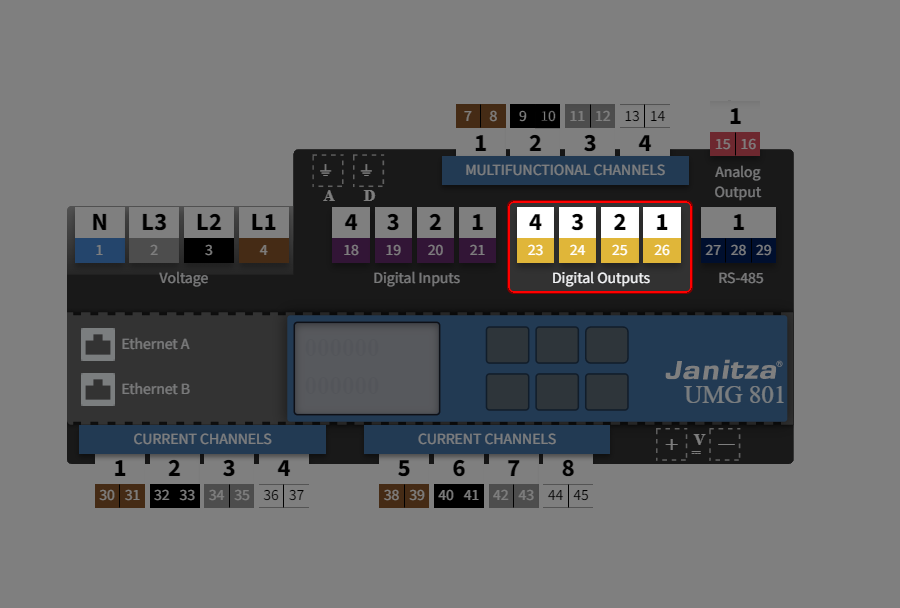
How do I set the digital output?
Step 1: Make settings via the device overview
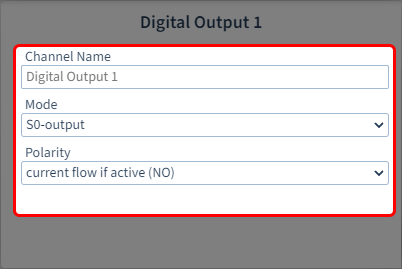
The following parameters are available
Channel name:
Enter the name of the channel
Mode:
S0 output
RCM
Polarity
Select the polarity of the output:
Normally open contact (NO) → current flow when active
Normally closed contact (NC) → Current flow when inactive
Step 2: Select digital S0 output
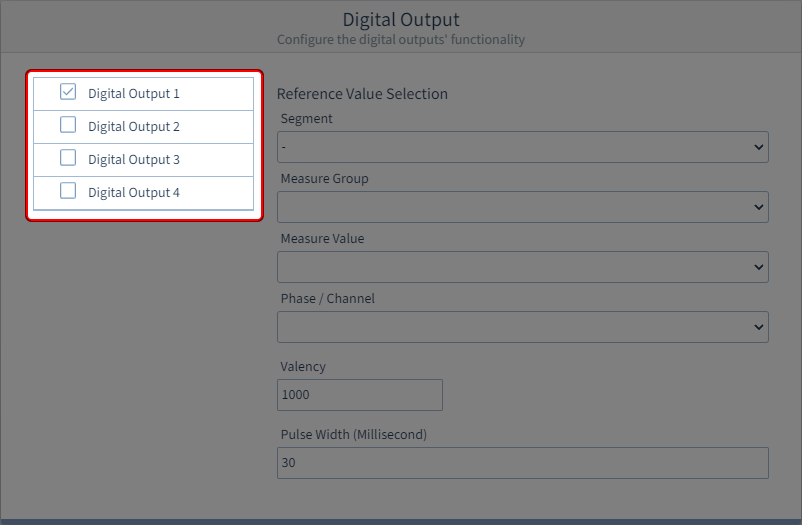
First select the digital input you want to configure.
Multiple selection is not possible.
Step 3: Configure a digital S0 output
The following parameters are available
Segment
Select the component from which the reference value originates:
Basic device
Module 1
Module 2
…
Measurement group
Select the measurement group of the reference value.
Measured value
Select the type of the measured value.
Phase / Channel
Select the channel whose measured value is to be used.
Pulse valency
Specify a value and the unit of the pulse valency.
The pulse valency indicates how much energy (Wh or varh) corresponds to one pulse.
Pulse width
Specify the pulse width (pulse duration) in milliseconds. The typical pulse duration for S0 pulses is 30 ms.