Analogue Output
What do I use the analog output for?
Measuring transducer (0../4..20 mA)
A selected measured value can be transmitted via the analog output, for example, to the building management system or to another device with an analog 0..20 / 4..20 mA input.
How do I set the analog output?
Step 1: Make settings via the device overview
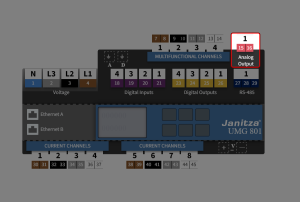
To open the configuration of an analog output
Click on the analog output in the device overview.
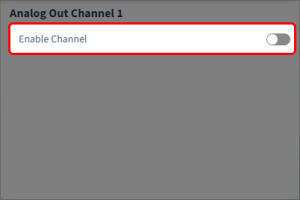
Activate the analog output via the slider.
The configuration card of the analog output is displayed in the configuration area only after activation.
Step 2: Configure the analog output
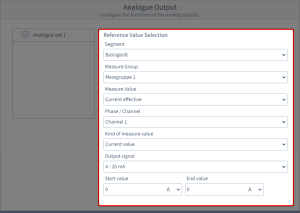
The following parameters are available
Segment
Select the component from which the reference value originates:
Basic device
Module 1
Module 2
…
Measure group
Select the measurement group of the reference value.
Measure value
Select the type of the measured value.
Phase / Channel
Select the channel whose measured value is to be used.Kind of measure value
Select the type of measured value (momentary, minimum, maximum, average).
Output signal
Specify the range of the output signal: 0 … 20 mA or 4 … 20 mA
Start value
Enter a measured value start value for the standard signal (0 or 4 mA).
End value
Enter a measured value end value for the standard signal (20 mA).
EXAMPLE: Selection of start and end value:
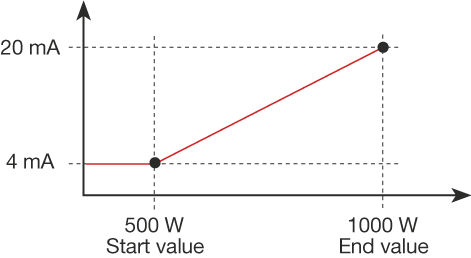
In this example, the active power in the range of 500..1000 W scales to the standard signal of 4...20 mA.
Measured value: Active power
Output signal: 4 ... 20 mA
Start value: 500 W
End value: 1000 W
If the active power is 500 W, 4 mA are output at the analog output,
while an active power of 1000 W produces an analog output of 20 mA.