Donut Chart
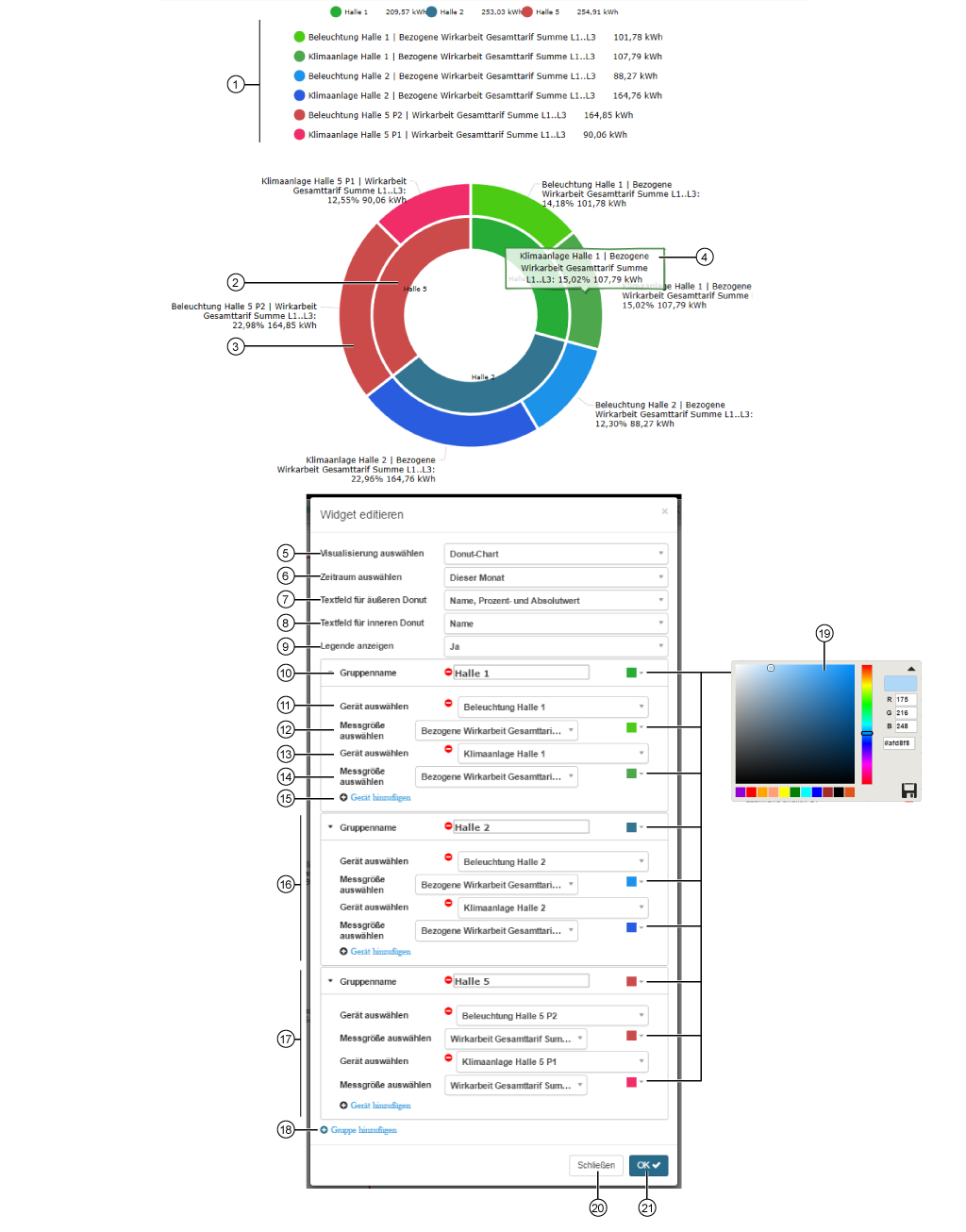
The donut chart (ring chart) shows
quantities as absolute values or as percentages of a whole, while simultaneously displaying two data series (inner + outer donut).
quantities or groups of quantities as individual segments.
|
Position |
Description |
|
1 |
|
|
2 |
|
|
3 |
|
|
4 |
Hold the mouse cursor over an outer donut segment to see a description (individual measuring devices). Display:
Inner donut segments (measuring device groups) have no description displays. |
|
5 |
|
|
6 |
Selection of the timeframe presented:
|
|
7 |
Shows, depending on the option selected, labels (descriptions) for individual measuring devices in the outer donut segments:
|
|
8 |
Shows, depending on the option selected, labels (descriptions) for the measuring device groups in the inner donut segments:
|
|
9 |
Options:
|
|
10 |
|
|
11 |
|
|
12 |
|
|
13 |
|
|
14 |
|
|
15 |
|
|
16 |
|
|
17 |
|
|
18 |
|
|
19 |
Selection of colors for the Measuring Device Groups and Quantities of the Individual Measuring Devices in the donut chart.
|
|
20 |
|
|
21 |
|
