Energy Overview (Single)

images/download/attachments/251037639/W_energieuebersicht_single_EN-version-1-modificationdate-1519830946000-api-v2.png

Position

Description

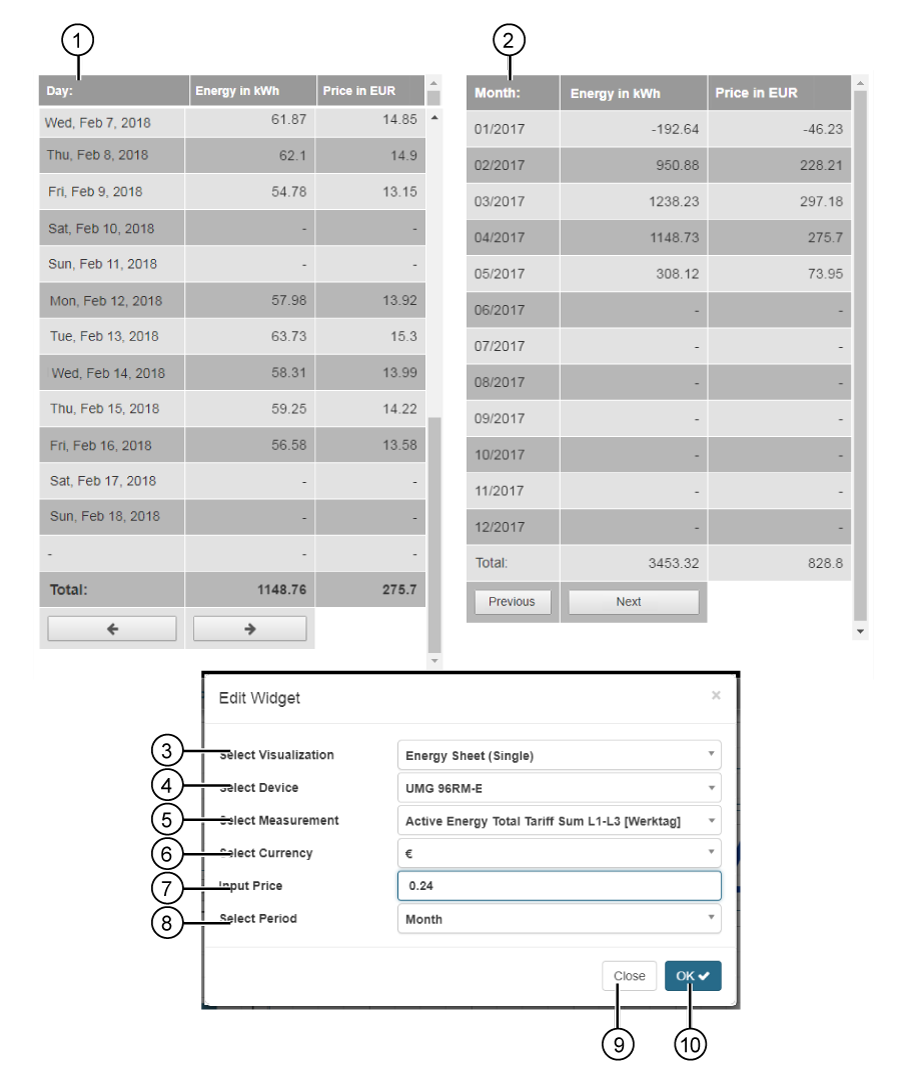
1

  • Table with energy data from a measuring device (quantity and price) for one month.

  • Selection of the month with the buttons images/download/attachments/251037639/monat_zurueck-version-1-modificationdate-1517404237000-api-v2.png and images/download/attachments/251037639/monat_vorwaerts-version-1-modificationdate-1517404237000-api-v2.png .

2

  • Table with energy data from a measuring device (quantity and price) for one year.

  • Selection of the year with the buttons Back and Forwards.

3

  • Selection of the Widgets (visualization).

  • Energy Overview (Single) selected.

4

  • Selection of a measuring device (single).

  • Includes all devices with memory (historical data) in your project.

5

  • Selection of an energy quantity, of the previously selected device.

6

  • Selection of Currencies.

7

  • Entry of the valid energy price per kWh in your region.

8

Entry of the timeframe to be presented of the Energy Overview (Single):

  • Month (cf. Pos.1)

  • Year (cf. Pos.2)

9

  • Closes the assistant Edit Widgets without saving the entries.

10

  • Saves your configuration.

  • The Widget appears on the Dashboard.