Min/Max Overview


images/download/attachments/251037673/W_MinMax_uebersicht_EN-version-1-modificationdate-1519913790000-api-v2.png

Position

Description

1

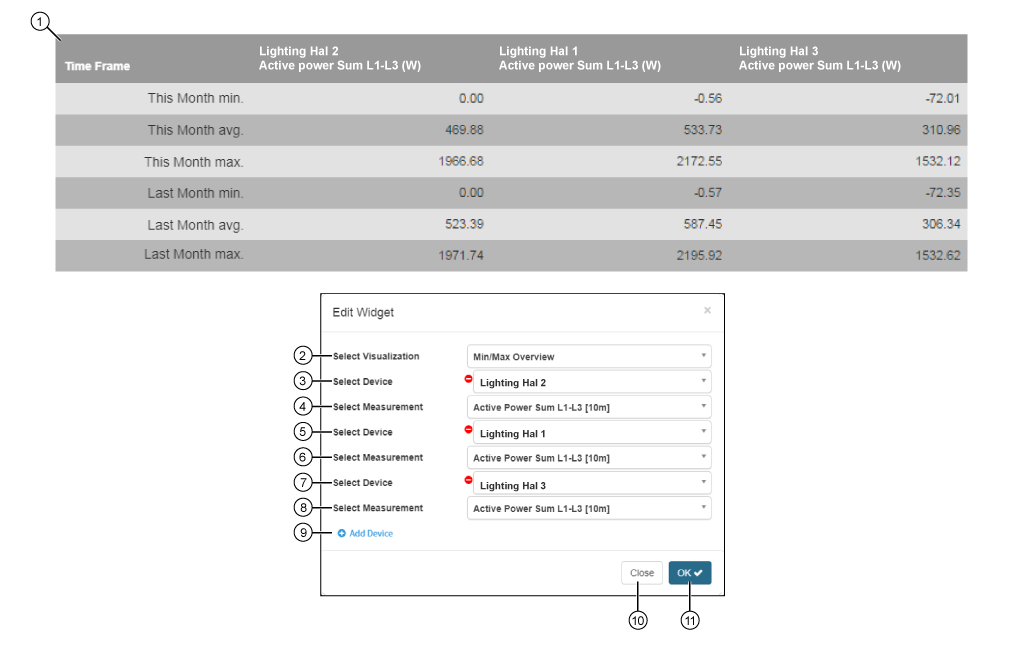
The table shows for comparison:

  • Minimum, maximum and average values of up to 5 measuring devices and 5 quantities.

  • One column Time Range with the current and previous month.

2

  • Selection of the Widgets (visualization).

  • Min/Max Overview selected.

3

  • Select device.

  • Contains all of the devices in your project (device overview).

4

  • List of quantities, and those of the previously selected device.

5

  • Selection of the second device.

  • Contains all of the devices in your project (device overview).

6

  • List of quantities, of the second device.

7

  • Selection of the third device.

  • Contains all of the devices in your project (device overview).

8

  • List of quantities, of the third device.

9

  • Creates a new device (with quantity selection) for the table Min/Max Overview.

  • Configuration of up to 5 devices (with their respective quantity selection).

10

  • Closes the assistant Edit Widgets without saving the entries.

11

  • Saves your configuration.

  • The Widget appears on the Dashboard.