Text Editor
Attention!
The extended security for dashboards prevents potentially malicious scripts from being loaded from other websites or potentially malicious code being executed by dashboard elements (see System settings )!
Note that this will prevent certain functions from being available, such as embedding maps or web pages that require a login (including GridVis internal pages)!
Before disabling this protection mechanism, make sure that the code used has been implemented by trustworthy persons and does not represent any threat!
|
Position |
Description |
|
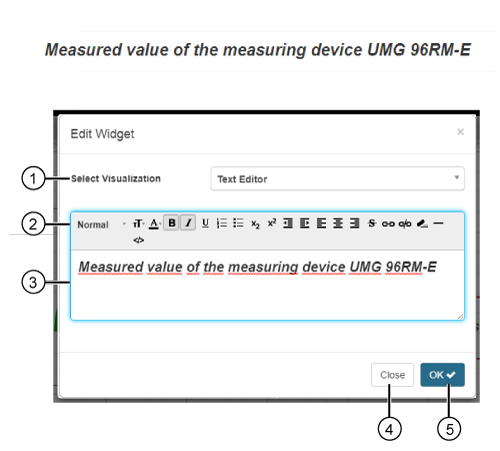
1 |
|
|
2 |
|
|
|
|
|
|
|
|
|
|
|
|
|
|
|
|
|
|
|
|
|
|
|
|
|
|
|
|
|
|
|
|
|
|
|
|
|
|
|
|
|
|
|
|
3 |
|
|
4 |
|
|
5 |
|
 Selection between 8 text format and headline format templates.
 Selection of font sizes for the marked text.
 Opens a color palette for the selection of the font color of the marked text.
 Formats the marked text in bold.
 Formats the marked text in italics.
 Underlines the marked text.
 Creates a numbered list.
 Creates a bulleted list.
 Lowers the marked text.
 Places the marked text higher up.
 Decreases the margin.
 Increases the margin.
 Justify text on the left side.
 Center text.
 Justify text on the right side.
 Crosses out the marked text.
 Link the marked text with:
 Removes the link on a marked text.
 Deletes the formatting of the marked text.
 Creates a horizontal line in the text editor Input Area and thereby in the Widget Frame.
 Switches to the html source text format.